Scan Date:Oct 10, 2024
Show More
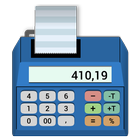
Office Calculator is a calculator with a virtual tape.
It supports commercial rounding, easy percentage calculation and does correct tax calculation.
Install it on your device and you get the optimal calculator for office tasks.
Virtual Tape
You can switch between calculator view and and tape view to have a full screen view of the tape.
Just tap on the tape icon to switch between views.
The tape of the calculator can have up to 1000 lines.
Corrections on the Tape Tape
You can change values on the virtual tape to make corrections.
For corrections go to the context menu of the tape line with a long press.
Percentage Calculation
The calculator has percent calculation to add or subtract percent values.
The tape will display the percentage and the resulting value.
Tax Calculation
The calculator has tax buttons (TX+, TX-) to add or sub tract tax (sales tax, VAT)
This makes it very easy to calculate tax amounts with the calculator.
The tape will display the tax rate and the resulting value.
Annotations on the Tape
You can write a comment to a tape line.
Fixed Point and Floating Point Calculation
The fixed point arithmetic has 20 digits and 0 - 4 decimal places.
The floating point arithmetic has 64 bits (IEEE double precision).
By default, the calculator works with fixed point arithmetic and 2 decimal places as needed for most calculations with amounts.
Rounding
The calculator supports three rounding modes: up, down or 5/4.
This is the ad-sponsored variant of Office Calculator,
a Pro variant of Office Calculator without ads is also available.
Latest Version
5.3.9Uploaded by
Kaung Zay Ya
Requires Android
Android 5.0+
Category
Free Finance AppContent Rating
Everyone
Security Report
Report
Flag as inappropriateLast updated on Jul 26, 2024
Optimized memory management to reduce memory usage



APKPure - A multi-platform app store primarily focused on Android, providing extensive app-related content. Discover the app you want easier, faster, and safer, with quick and efficient downloads and installations.