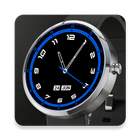
Nice Time Watch Face
Beautiful watch face for your Android Wear device.
To access customization options (in hand held device)
1. Open Android Wear app.
2. Select 'Nice Time' as the active watch face
3. Tap on the settings icon on top of the watch face icon
Upgrade to PRO to customize the look of the watch face.
Latest Version
1.0.1Uploaded by
ﺳﺎﻫﺮ ﺍﻟﻠﻴﻞ
Requires Android
Android 4.3+
Category
Free Personalization AppContent Rating
Everyone
Report
Flag as inappropriateLast updated on Jan 6, 2016
1. Bug fix for round watches



APKPure - A multi-platform app store primarily focused on Android, providing extensive app-related content. Discover the app you want easier, faster, and safer, with quick and efficient downloads and installations.