Scan Date:May 7, 2026
Show More
myCircadianClock.
The myCircadianClock app is for use in research studies examining how diet, exercise, and sleep affect health. Our body contains circadian (circa – approximately and dian – day) or 24 h clocks that influences the timing of sleep, hunger, metabolism, and physical ability. Research studies run in different locations are trying to understand the interaction between “how much” and “when” we sleep, eat, or exercise for better health. You need an activation code from these research studies to download and use the app.
Following are the key features:
Camera function to snap picture of everything you eat or drink
Sleep tab to record time to bed and time of waking up, and sleep quality
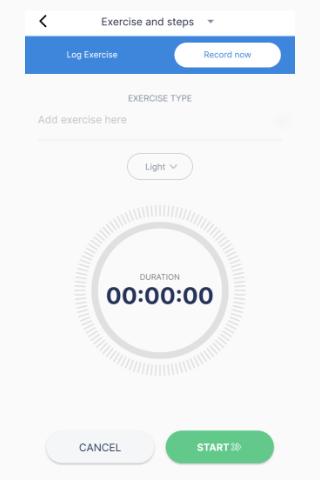
Exercise tab to log physical activity
Food and Beverage tab to log all dietary intake including an autofill option to add frequently eating items easily
Water tab to log water
Health tab to log and monitor health parameters
Medication reminders to track your medicine/ supplement intake
Contact the research coordinator for any questions/ help.
Blogs tab to read scientific blogs on various topics like food, nutrition, sleep, time-restricted eating, etc.
Additional Features:
Health Tracking : Now you can track your results for a wide variety of vitals and blood tests. You can now also log in metric units.
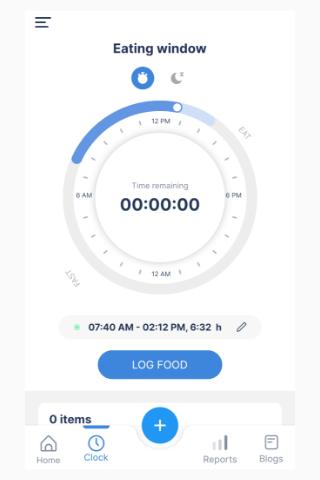
Daily tracking and study status info on the home page : With a quick glance at the homepage, you can see when you ate that day, step counts, last night’s sleep duration, and where you are in the study.
Step Counts : Now you can view your step counts from Google Fit/ Apple Health in the app.
Notifications are used to provide health tips and reminders.
Settings : You can set your eating, sleeping, and exercise targets in one place. You can also set reminders for sleep, medicine, and water, eating window start and end notifications from the settings page.
Meditation tracking.
Improved user experience : The myCircadianClock app has been redesigned to make it easier and more enjoyable to use.
For more information, please refer to our [Privacy Policy](https://www.mycircadianclock.org/privacy/).
Latest Version
16.10.39Uploaded by
Gió
Requires Android
Android 8.0+
Category
Free Health & Fitness AppContent Rating
Everyone
Security Report
Report
Flag as inappropriateLast updated on May 7, 2026
Bug fixes and improvements!





APKPure - A multi-platform app store primarily focused on Android, providing extensive app-related content. Discover the app you want easier, faster, and safer, with quick and efficient downloads and installations.