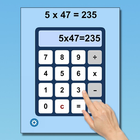
In this program there is an incomplete number statement (for instance, 3 x 9 = ) at the top of the screen. There is also a calculator in the lower part of the screen. The student should click on the numbers and symbols shown in the number statement. If the student clicks on the calculator keys correctly, the complete number statement (3 x 9 = 27) will appear at the top of the screen.
Setting
Single Digit Multiplication
This multiplies single-digit numbers.
Double Digit Multiplication
This multiplies double-digit numbers.
Single and Double Digit Multiplication
This multiplies single- and double-digit numbers.
Sound
When this is selected the program voice will guide the student.
Show Number
When this is selected the calculator display will show only the number that the student has clicked.
Show Number Statement
When this is selected the calculator display will show the numbers and symbol in the number statement
Latest Version
1.0Requires Android
5.0
Category
Education AppContent Rating
Everyone
Report
Flag as inappropriateLast updated on Apr 16, 2021
This release includes minor bug fixes and general improvements. Update to the latest version for the best experience.





APKPure - A multi-platform app store primarily focused on Android, providing extensive app-related content. Discover the app you want easier, faster, and safer, with quick and efficient downloads and installations.