Scan Date:Nov 30, 2025
Show More
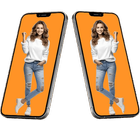
Set your own or your beloved photo on mobile phone screen.
Features:
There are many frames you like most.
Now you can add stickers, effects and text with different colors on your photo.
You can save your completed or edited photo and can share it on social media or email it etc.
This app is free and very easy to use.
How to use?
Install and play the app.
Here you can view privacy policy and the how to use.
Click the Start button to play the app.
Start button will lead you to the main page where the entire frames are visible.
You can select one frame at a time you like most for your photo montage.
You can select you face photo from your gallery or direct from your cell phone camera.
You can flip your face in suitable direction.
You can adjust the brightness of you face according to the color scheme of frame.
When done click Next button.
Next page allows to paste text stickers and love stickers on your photo and to adjust their location, size and direction. You can delete any pasted sticker.
If you done with stickers, then go next.
Next page offer you to frame you photo in beautiful wall frames and others. And you can draw a border around your photo of any size/width and color.
Next and last page allow you to save your edited photo and share it with your family and friends.
To delete your edited photo, go to your phone gallery and delete the photo.
Disclaimer:
This application complies with US copyright law guidelines of fair use. If you feel there is a direct copyright or trademark violation that doesn't follow within the fair use guidelines, please contact us directly.
Latest Version
1.19Uploaded by
NooNmoom ThgilThgil
Requires Android
Android 6.0+
Category
Free Photography AppContent Rating
Everyone
Security Report
Report
Flag as inappropriateLast updated on Dec 31, 2025
Minor bug fixes and improvements. Install or update to the newest version to check it out!




APKPure - A multi-platform app store primarily focused on Android, providing extensive app-related content. Discover the app you want easier, faster, and safer, with quick and efficient downloads and installations.