Package Name:com.minimalm01ebon
SHA-256:37f4b2dd9d07a78d60f988ca830e8d0d1a528cf7bd4584b3c5b78723b2bc40d8
Show More

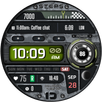
Experience minimalistic design and smart functionality with the Minimal Ebon Hybrid Watch Face. Featuring a sleek analog interface and a digital screen for essential data, it offers two custom complications and various personalization options for a unique, minimal aesthetic.
Key Features:
Minimalistic hybrid dial design
Two user-defined complications
Three user-defined custom shortcuts
Always-On Display (AOD)
Displays:
Analog time
Digital smart screen showing calendar, battery, and notification info
Analog step goal and heart rate dials
Customizations:
(Press and hold the center of the watch display. Tap the customize button.)
Eight different background options
Three watch hand styles with customizable second hand color
Two index styles
Two Always-On Display options along with two AOD brightness options
(Please note that the AOD feature will reduce battery life.)
To set up app shortcuts and custom complications:
Press and hold the watch display.
Tap the customize button.
Swipe left until you reach "Complications".
Select the 3 app shortcuts and 2 custom complications to configure your desired settings.
Measuring Heart Rate
Heart rate is measured automatically. On Samsung watches, you can change the measurement interval in the Health settings. To adjust this, navigate to your watch > Settings > Health.
Compatibility:
This watch face is designed for Wear OS devices operating on WEAR OS API 30+, including the Samsung Galaxy Watch 4, Samsung Galaxy Watch 5, Samsung Galaxy Watch 6, and other compatible models.
Note: The phone app serves as a companion to make it easier to install and find the watch face on your Wear OS watch. You can select your watch device from the install drop-down menu and install it directly on your watch.
If you encounter any installation issues, please read the detailed instructions on the companion app or contact us at timecanvasapps@gmail.com.
"Enjoying this design? Be sure to check out our other creations. More designs will be available on Wear OS soon. For quick contact, please email us. We welcome and value all feedback in the Play Store—whether it's what you love, what needs improvement, or any suggestions you have. We welcome your design ideas and suggestions. We make it a priority to consider all feedback.
Latest Version
1.3Uploaded by
Abng Lausu
Requires Android
Android 7.0+
Category
Free Personalization AppContent Rating
Everyone
Security Report
Check Now
Report
Flag as inappropriateLast updated on Feb 19, 2026
General performance and stability enhancements.



APKPure - A multi-platform app store primarily focused on Android, providing extensive app-related content. Discover the app you want easier, faster, and safer, with quick and efficient downloads and installations.