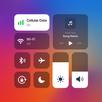
Mi Control Center is a unique phone customiser and it will change the way you use your device. Personalise your phone to MIUI or iOS design easily with a powerful control center!
Separate your quick settings from your notifications. Swipe down from the left of the status bar to read your notifications and from the right side to control your device settings and perform meaningful actions. Trigger areas can be customised as you wish.
Powerful Control Center - Customise Your Device!
Quick access to the camera, clock, and other settings in the control center. Powerful options to customise your mobile with quick access to settings and actions.
Features of My Control Center
Two different layouts: combined notifications and quick toggles, or separate with control center Similar to MIUI 12+.
- Full color customisation: Take the base layout and color all the elements how you like.
- Useful icons with your current device information
- Adjustable background types: Choose a solid color, live or image static blur. Change the transparency and blur amount.
- Advanced custom notification bar: Get, read, snooze or dismiss it.
- Quick reply: Reply to your messages as soon as you see them. For all Android devices.
- Auto bundled: Tired of that one app that spams you with notifications? Now they're all grouped together, for easy control.
- Custom background picture: Pick your favorite image to be displayed in the shade. Customise mobile with unique control center easily!
Mi Control Center gives you quick access to settings, screen recorders, screenshots, night mode changes, screen locks, volume controllers and your favorite applications.
Use of Accessibility Service:
Mi Control Center app uses the AccessibilityService API to provide the best possible experience.
- We do not collect any personal information through accessibility services.
- We will not read your screen's sensitive data or any content.
- For this app to function properly, we need the Accessibility Permission. Accessibility services are required to receive a response from the system when the top of the screen is touched to trigger the shade and to retrieve window content: Required for automatic clicking of some settings after the user chooses they want to toggle them in the app-provided interface.
Thank you for choosing Mi Control Center ! Don't forget to leave us a review if you like our app.
Latest Version
1.4Uploaded by
Thư Quà Ţặng
Requires Android
Android 7.0+
Category
Free Personalization AppContent Rating
Everyone
Report
Flag as inappropriateLast updated on Jun 2, 2023
Minor bug fixes and improvements. Install or update to the newest version to check it out!



APKPure - A multi-platform app store primarily focused on Android, providing extensive app-related content. Discover the app you want easier, faster, and safer, with quick and efficient downloads and installations.