Scan Date:Feb 26, 2026
Show More
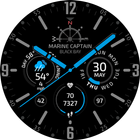
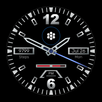
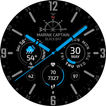
The Marine Captain Watch Face for Wear OS offers 6 customizable slots for complications. There are 3 positions: left, right, and bottom. Each position can accommodate 2 complications, which will rotate, alternating with each other.
Tapping the center of the watch face makes the hands transparent, allowing you to better see the complications (available only on watches). If you have reverse complications installed, then when you tap the center of the watch face again, the complications will flip manually with each tap.
The app on your phone is necessary for setting up the Marine Captain watch face and transmitting the phone’s battery level to the watch. You can create your own themes only from the app on your phone. The Marine Captain watch face can be configured from the watch.
Built-in complications and Features:
• Weather: Requires access to your location. Displays the current weather, upcoming temperature changes, and wind speed. If adverse weather is expected in the near future, this will be shown in the complication. The weather forecast works without internet access (usually up to 2 days) using a previously downloaded forecast.
• Financial data: Displays currencies, cryptocurrencies (Bitcoin BTC, Ethereum ETH, etc.), stocks (AAPL, GOOG, etc.), futures (gold, brent oil, etc.), ETFs, funds, and stock indices (e.g., S&P 500).
• Tides: Requires access to your location and may not be supported in all countries and regions. Shows the tide forecast of the nearest tide measuring station to you.
• Air Pollution: may not be supported in all countries and regions.
• Calendar events in the Logo complication: Requires read access from the calendar.
• Data from Health Services: Shows data such as heart rate, steps, distance, calories, and floors, depending on the model of your watch.
• Date: Date with sunrise/sunset time and moon phase.
• World time: Allows you to view the current time in various locations around the world.
• Sensors: Includes a barometer and altimeter. The altimeter uses only barometric data to calculate altitude (barometric altimeter). The altimeter requires access to your location to obtain barometric data above sea level at your location.
• Hourly Chime: Provides hourly alerts, sound and vibration are available.
• Third-party developer complications: Allows you to use complications from third-party developers. Can only be configured from the watch.
Built-in apps:
These apps can be installed as shortcuts if the corresponding complication is installed:
• Weather: Displays an hourly forecast in a circular format. You can scroll through the forecast (tap and hold the highlighted area and rotate). The next screen displays a forecast for up to 6 days.
• Tides: Shows a tide chart for up to 6 days.
Attention:
The app on the phone is necessary to transmit the phone’s battery level to the watch. Without the app installed on the phone, the phone’s battery level will not be displayed on the watch.
The Premium license only removes the “Free Version” watermark at the bottom of the watch face screen. All functions and complications of the watch face are available for free.
Requirements for Marine Captain Watch Face:
• Watch Face: smartwatch with Wear OS 4.0 only.
• Mobile app: mobile device with Android 13 or higher.
Latest Version
1.276Uploaded by
احمد احمد حيدر
Requires Android
Category
Free Personalization AppContent Rating
Everyone
Security Report
Report
Flag as inappropriateLast updated on Sep 29, 2025
Minor bug fixes and improvements. Install or update to the newest version to check it out!




APKPure - A multi-platform app store primarily focused on Android, providing extensive app-related content. Discover the app you want easier, faster, and safer, with quick and efficient downloads and installations.