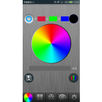
Connect with the WIFI controller,make sure the WIFI connection name is "LN****(LN001-LN016)".
According to your controller type and choose the controlling interface to set up the software Click the SETUP
button to enter the setting interface and select the control interface for the corresponding device.
First,select one of the right button on the controlling device WF100,WF103,WF200,WF300. that means choose the WIFI controller, and then set up the controlling parameter according to the controller type.
IF the software can not be controlled in the normal way.
1.Checking whether WIFI is connected Correctly,otherwise reselect the WIFI controller.
2.Check the "Simulation" is on ,need turn off it.
3.And the checking the controller type,the parameter is right or not,otherwise correct the parameter.
Latest Version
1.0Uploaded by
علي الزوبي الزوبي
Requires Android
Android 2.2+
Category
Free Business AppContent Rating
Everyone
Report
Flag as inappropriateLast updated on Apr 4, 2017
Minor bug fixes and improvements. Install or update to the newest version to check it out!



APKPure - A multi-platform app store primarily focused on Android, providing extensive app-related content. Discover the app you want easier, faster, and safer, with quick and efficient downloads and installations.