Package Name:etherean.solutions.locationmaster
SHA-256:e3853ddb9d39f9778af33907b743df25b56c4324566c36560bafe7c271bbb624
Show More

Description
Location Master App provides extensive functionality for geo-features, including Points, Paths/Lines, and Polygons. A brief overview of each is given below:
Point:
The application provides real-time details about the current location, including latitude, longitude, altitude, accuracy, and address. Additionally, it allows searching for any other location or place, with all these details calculated automatically. Then, points can be saved along with attribute data.
Latitude and longitude values are supported in multiple units, including decimals, degrees-minutes-seconds, radians, and gradians. Saved points can be displayed on Google Maps, shared, copied, edited, and exported in KML, KMZ, and JPG formats.
Path:
This app enables the digitization of lines/paths directly on the map. Paths can be saved along with relevant attribute data, such as length, title, description, date, and time. Length is automatically calculated and displayed in various units, including inches, feet, yards, meters, furlongs, kilometers, and miles.
Paths are easily modifiable by selecting vertices to delete or reposition. Any adjustments recalculate the length in real-time. There are labels along each side of the path which is showing its length. Toggling option allows the user to turn ON or OFF these side-length-labels.
Paths/routes can also be drawn in real-time using the path tracking feature, which automatically maps the route as traveled. Options to pause and resume tracking ensure flexibility, and tracking continues even when the screen is off or the app is closed.
Saved paths are viewable on Google Maps, and can be edited and shared in formats like KML, KMZ, and JPG.
Polygon:
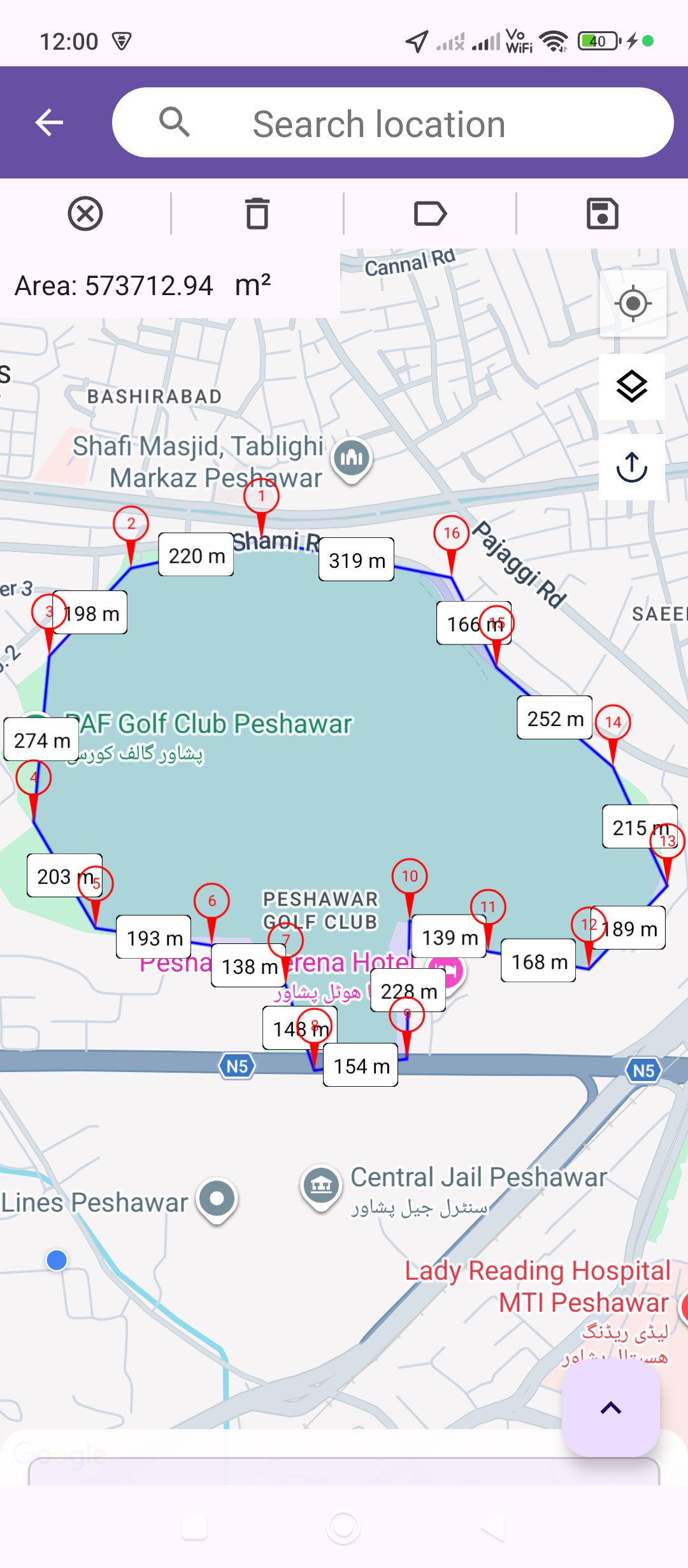
This app supports digitizing polygons on the map. Polygon can be saved with associated attributes such as area, title, description, date, and time. The area is automatically calculated and can be displayed in units like square feet (ft²), square meters (m²), square kilometers (km²), Marla, and Kanal.
Polygons are customizable by selecting vertices to delete or reposition. Adjustments trigger real-time recalculations of the polygon area. Each side having label showing its length. The side length labels can be toggled.
Saved polygons can be viewed on Google Maps, edited, and exported in KML, KMZ, and JPG formats.
Analyze & Visualize:
Import & visualize geographic data from KML/KMZ/GeoJSON files on an interactive map. Use the search bar to filter out the imported geometries by their attributes. Manage multiple layers by toggling visibility or deleting them. Edit the geometry of any Point, Line, or Polygon by dragging its vertex handles to new positions and save or export the map view as a PNG image with a custom title and geometry stats overlay — both shareable with one tap.
A summary chip provides an instant overview of key statistics including total length, area, and point count.
Other Interesting Features:
1. When saving or updating a point, path, or polygon, the user does not need to manually type the title or description/address. Just speak and speak-to-text feature will convert it to text automatically.
2. Another notable feature is the ability to take pictures, where the user's location details—such as latitude, longitude, altitude, accuracy, address, date, and time—are overlaid on the image.
3. Additionally, users can search for a specific point using latitude and longitude. Other related data, like altitude and address, can be calculated and saved for future reference.
Note: While installing the app, make sure to grant all the necessary permissions requested in the prompts, including location, media, gallery, and camera permissions. The app will create a folder named LocationMaster in the Documents directory, where all the exported KML and KMZ files will be stored. Additionally, another folder with the same name will be created in the DCIM directory to store all the exported images as well as photos taken with the camera in JPG or PNG format.
Latest Version
1.2.2Uploaded by
Nilza Silva
Requires Android
Android 6.0+
Category
Free Maps & Navigation AppContent Rating
Everyone
Security Report
Check Now
Report
Flag as inappropriateLast updated on Jul 30, 2026
- Digitize and save Points, Paths, and Polygons with attributes.
- Record your Paths in live mode. It will work even if the app is closed and mobile screen is off.
- Pause/Resume functionality for live tracking.
- Saved geometries can be displayed, edited, and shared/exported in multiple formats like KML/KMZ/JPG.
- Users can capture images with overlaid location details.
- Import, visualize, search, and edit geometries on an interactive map with multi-layer support and vertex editing.





APKPure - A multi-platform app store primarily focused on Android, providing extensive app-related content. Discover the app you want easier, faster, and safer, with quick and efficient downloads and installations.