


Package Name:com.cryfish.liverybussidshdlengkap
SHA-256:39bd77c5892fe0e2e9e46ed94678845de64ed8861ca3f41d8867de13c5248610
Show More
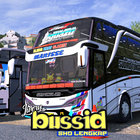
BUSSID SHD Livery is a graphic design or bus skin that you can install on the Super High Deck (SHD) type bus in the Bus Simulator Indonesia (BUSSID) game. This SHD bus has a distinctive high body with a trunk space that can be seen from front to back.
With livery, you can change the standard appearance of the SHD bus to be more attractive, cool, or even resemble famous buses in Indonesia. There are so many choices of SHD livery made by the BUSSID community, ranging from tourist bus livery, intercity buses, to other unique designs.
How to Install BUSSID SHD Livery:
Installing livery on BUSSID is really easy! Follow the steps below:
1. Download the livery you want
Find and download the BUSSID SHD livery file that you like. Usually, this livery file is in the form of an image with .PNG format and is small in size.
2. Open the Indonesian bus simulator game
After downloading the livery, open the Indonesian bus simulator game application on your device.
3. Select Garage
From the main menu, select the "Garage" option.
4. Select SHD Bus
Make sure you already have or are using an SHD type bus. If not, you can buy it first in the dealer menu.
5. Enter the Livery Option
In the garage display, look for the paint palette icon or the words "Livery". Tap the icon or words.
6. Upload Livery
- Select the "Select Livery File" option.
- Then, select "Device Gallery".
- Find the .PNG livery file that you downloaded earlier in your phone gallery. Usually, the file is in the "Download" folder.
- Select the livery file.
7. Apply Livery
After the livery is selected, you will see a preview of the livery installed on your bus.
8. Select the "Install" option.
You will be given the option to install the livery for "Free".
9. Choose one according to your wishes.
10. Congratulations! Your dream SHD livery is now installed on your BUSSID bus. Your bus is now cooler and more unique!
So, are you ready to try the SHD bus with this cool livery?
Latest Version
1.9Uploaded by
Izael Pereira
Requires Android
Android 5.0+
Category
Free Entertainment AppContent Rating
Everyone
Security Report
Check Now
Report
Flag as inappropriateLast updated on Sep 22, 2025
Koleksi Skin Bus Terlengkap
Support sdk 35




APKPure - A multi-platform app store primarily focused on Android, providing extensive app-related content. Discover the app you want easier, faster, and safer, with quick and efficient downloads and installations.










