Package Name:com.cubesugar2014.lexi_desk
SHA-256:35c72424c89836c72ec4e47714b539b2f3630327004bb314726b7254c6315edf
Show More

LEXiby DESK: Automation for video App.(like a y**tube)
- Make your phone Video or Retro Game machine easily.
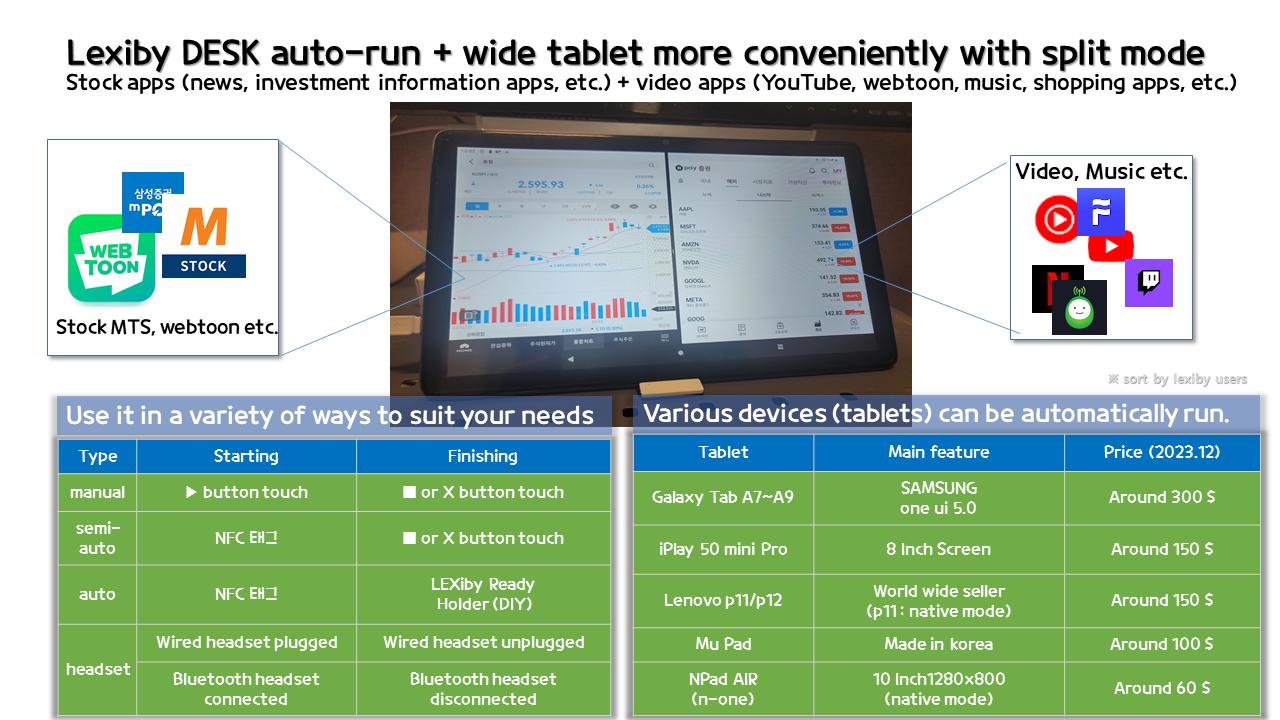
** You can run and finish 2 selected apps with split screen
(Currently supported devices: Samsung Galaxy, Samsung tablet a7, LG, Lenovo P11, Mu-pad, iPlay mini, N-One npad air, Google, etc., see lexiby.com for details)
- If you have a smart plug, you can use the feature to increase battery life by preventing overcharging the battery
- Smart desk for video (or webtoon) App. with Automation of starting, finishing, ads skipping. Easy launch two Apps as split screen.
- If you finish setting it up once, Video App.(Y**TUBE) Ads skip is applied even - if you don't do anything else. and automatic scroll feature is added for webtoon viewer (NAV** WEBTOON)
- When an advertisement video is shown, turn down the sound. (optional)
- In case of loss, send GPS location to Connectivity.(slack or telegram)
- Launch & finish App. with headset (bluetooth or legacy headset)
LEXiby DESK supports automatic running even without power in 6 ways.
1. One-touch manual launch and shutdown
2. Auto Run and Manual Shutdown (NFC)
3. Fully automatic execution termination (LEXIBY READY cradle required)
※ You can DIY the cradle with a little work on the existing cradle.
4. with headset (wired or bluetooth)
5. Run our lexiby App.(Rocket mode)
6. with USB device (OTG)
For details, refer to the LEXiby DESK tab at http://lexi.co.kr
◈ Our App. uses the Accessibility Services API (AccessibilityServices API) and complies with Google's policies.
○ Every time you use the Navi app (driving), you have no choice but to change the settings of your mobile phone and repeatedly close the app and return to settings after driving. To improve user convenience by automatically doing this, some functions use accessibility API this is absolutely necessary.
○ Accessibility permission is required to use the following functions among all the functions of our app. If you don't want to use it, you can exclude the function.
- Close the launched App. in our app
- Turn on and off functions such as airplane mode, Wi-Fi, mobile data, and hotspot
- Initial setting of the launched app (in the case of navigation, entering safe driving, etc.)
- Use of the Air button (visiting other apps or sites with one touch while navigation App. is running)
- Try to shutdown for battery
○ Our App. is using android.permission.BIND_ACCESSIBILITY_SERVICE.
○ Our App. do not collect or share personal or sensitive user data.
Latest Version
1.0Uploaded by
Imam
Requires Android
Android 5.1+
Category
Free Productivity AppContent Rating
Everyone
Security Report
Check Now
Report
Flag as inappropriateLast updated on Dec 15, 2025
Added beginner's mode
Added USB(OTG) with headset feature
Added smart battery charging (with smartthings)
Added rocket mode (launching directly )
Added launch with headset feature
Added send GPS position to telegram or slack feature
Added launch after start & customizing voice message
Added Japanese & Spanish & Franch & Taiwanese language
Added Connectivity with slack & telegram
Added automatic scroll button for webtoon (Naver WEBTOON)
Added always skipping Ads. feature (YOUTUBE)




APKPure - A multi-platform app store primarily focused on Android, providing extensive app-related content. Discover the app you want easier, faster, and safer, with quick and efficient downloads and installations.