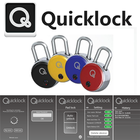
Your QuickLock Padlock has RF (Radio Frequency) capabilities that can be enabled with a tag, ring, bracelet, fob or card. This App only executes the Bluetooth aspects of your padlock while allowing you to see which person/method recently opened your security device. Once the App is installed and open on your hand held device, follow these instructions:
1. Depress the black button on the face of the Padlock, a blue light will flash.
2. Simultaneously, your Android will work to pair with the Padlock. This first time, you’ll be prompted to enter an initial password which is – 12345678.
3. The display will show the ‘lock – unlock’ button on your display. From the page, user is able to unlock and/or designate the auto unlock for each time the app is used and the black button on the Padlock is depressed.
4. Depress the settings COG in the bottom right-hand corner to alter password, change user, etc.
Security access and inventory management application
Last updated on Mar 6, 2017
Increase the end-user license agreement



APKPure - 안드로이드를 중심으로 한 멀티플랫폼 앱스토어로, 다양한 앱 관련 콘텐츠를 제공합니다. 더 쉽고, 빠르고, 안전하게 원하는 앱을 찾아보세요. 빠르고 효율적인 다운로드와 설치가 가능합니다.