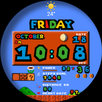
B2000
WATCH FACE INSTALLATION NOTES:
Check your watch's compatibility with WEAR OS before proceeding with the installation.
(Note: Galaxy Watch 3 and Galaxy Active are not WEAR OS devices.)
✅ Compatible devices include API level 30+ Google Pixel, Galaxy Watch 4, 5, 6, 7 and other Wear OS models.
🚨 Watch faces don't automatically apply on your watch screen after the installation.
That's why you MUST set it on your watch's screen.
FEATURES:
-Notification message
-Analog watch face switchable to 12H/24H via phone settings
-complication (editable)
-Steps Day
-Distance
-Heart rate
-Change color
Customization:
1. Touch and Hold Display
2. Tap on Customize Option
Complications:
You can customize with the any data you want.
For example , you can select weather , world clock , sunset/sunrise , barometer etc.
**Some features may not be available on some watches.
For further support, please contact: ejimatsus@gmail.com
Thank you for Your support.
Last updated on Oct 13, 2024
이 버전에는 사소한 버그 수정과 전반적인 개선 사항이 포함되어 있습니다. 최상의 환경을 위해 최신 버전으로 업데이트하세요.




APKPure - 안드로이드를 중심으로 한 멀티플랫폼 앱스토어로, 다양한 앱 관련 콘텐츠를 제공합니다. 더 쉽고, 빠르고, 안전하게 원하는 앱을 찾아보세요. 빠르고 효율적인 다운로드와 설치가 가능합니다.