INSTALLATION NOTES:
Make sure the watch is properly connected to the phone, open Companion App on phone and tap on "INSTALL APP ON WEAR DEVICE" and follow instructions on watch.
After a few minutes the watch face will transferred on watch : check the watch faces installed by the Wearable app on the phone.
Note: If you stuck at payment loop, DON'T WORRY, only one charge will be made even if you are asked to pay a second time. Wait 10 minutes or restart your watch and try again.
If you are having synchronization problems between your phone and Play Store, install the app directly from watch:
Please consider that any issues on this side are NOT developer dependent. The developer has no control over the Play Store from this side. Thank you.
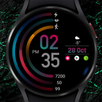
Minimalistic dial
-Displays digital time
-Displays the date
-Displays battery charge
To change the color and select an add-on, press and hold the watch face, then press settings, select the desired color or add-on
Last updated on 2022年07月03日
Minor bug fixes and improvements. Install or update to the newest version to check it out!



APKPure - Androidを中心としたマルチプラットフォームのアプリストアで、豊富なアプリ関連コンテンツを提供しています。より簡単に、より速く、より安全にアプリを見つけることができ、ダウンロードとインストールも迅速かつ効率的です。