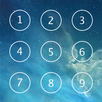
ISecret Applock Pro is an App Locker or App Protector that will protect your installed applications by using pin password and pattern!
Easy to use pass code security to securing your apps.ISecret Applock Pro can lock your contacts, calls, e-mail, sms, photos or any app in your phone or tablet.
Features:
* Protects installed Apps using password Pin.
* Run fast, lightweight, simplely interface and easy to operate.
* Multiple app lock theme.
* Creative Graphics , IOS Layout
* Professional and Secure Applock Master.
* Compatible with both phone and tablet.
* Pin password and pattern for security.
* Lock apps: lock your mail, photos and or any other apps from friends and families by setting pin password or pattern.
* Lock games: Prevent your child or some kids from playing games or buying unwanted things.
* Lock gallery: Your private photos will never be seen by others with this photo locker.
* Lock settings: Prevent your child from messing up the phone settings.
* prevent uninstalling the ISecret Applock by others
----------- FAQ ---------
► How To Use :
1. First You have Choose a 4 digit password when opening the application for the first time and after confirm it also.
2. optional and important, set the "Uninstalling prevention", than ISecret Applock Pro will not be uninstalled by others.
2. Application Lock :Select to which apps you have to lock, and make sure the "Enable App Lock" in setting was enable.
4. Optional : Access the settings screen for more options like theme change, background change, sound enable, and so on.
► How to uninstall AppLock?
If you do not have "Uninstalling prevention" enabled, you can uninstall ISecret AppLock Pro like you do to any other apps.
If you enabled "uninstalling prevention", please disable it first, Setting -> "Uninstalling prevention", then uninstall it normally.
Your apps will be protected and only you can open them!
Last updated on 2016年03月13日
fix bugs



APKPure - Androidを中心としたマルチプラットフォームのアプリストアで、豊富なアプリ関連コンテンツを提供しています。より簡単に、より速く、より安全にアプリを見つけることができ、ダウンロードとインストールも迅速かつ効率的です。