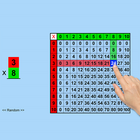
Click on “Multiplication Using Multiplication Table” and then click the “Enter” button to open this program. An incomplete number statement (for instance, 2 x 3 = ) appears at top of the screen. The program tells the student to click on the first number (2) which is highlighted in red in the left column, and then to click on the second number (3) which is highlighted in green in the top row. The answer (6) now gets a blue highlight, and the program tells the student to click on the answer. The answer moves up into the missing space in the number statement, and the program voice says “two times three is six.”
Mode
Training
This option is selected by default. When this is selected, the program can be used to teach the student.
Test
Select this option to measure the student’s progress. The “Report” button under “Test” mode is enabled.
Report
This displays results of the Test.
Settings
Horizontal Multiplication
If this is selected then the number statement at the top of the screen will be arranged horizontally.
Vertical Multiplication
If this is selected then the number statement at the top of the screen will be arranged vertically.
Congratulatory Animation
This box is checked by default. This is available only for the “Training” mode. When this is checked, clicking the correct number invites a congratulatory animation. This animation runs for ten seconds. Click anywhere on the screen or press space bar to stop the congratulatory animation.
Select All
If this is selected, then any and all of the numbers in this box will be used. To deselect this choice, click it again and selection will be ended.
Select Random Numbers
If this is selected, then the program will choose the numbers to be used in the problems
Ultima versione
1.2È necessario Android
5.0
Categoria
Gratuita Istruzione APPClassificazione dei contenuti
Everyone
Segnala
Segna come inappropriataLast updated on Apr 26, 2021
Questa versione include correzioni di bug minori e miglioramenti generali. Aggiorna alla versione più recente per un'esperienza ottimale.





APKPure - Un app store multi-piattaforma principalmente incentrato su Android, che fornisce un'ampia gamma di contenuti relativi alle app. Scopri l'app che desideri in modo più facile, veloce e sicuro, con download e installazioni rapidi ed efficienti.