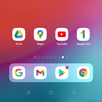
iBlurDock is a cool customization and personalization app to blur images/wallpapers and let you add iOS / iPhone like blurred dock to wallpaper then you can set wallpaper as home screen wallpaper.
- How to use
-- open app > select current wallpaper or choose from gallery
-- tap on Dock Style from sidebar
-- touch and move the dock to set position, double tap on dock to preview dock on home screen, while in preview you can move dock to set position and again double tap on dock in preview to confirm position
-- change blur value, dock width/height, corners, overlay color
-- make sure if your os has no virtual navigation button then uncheck navigation buttons checkbox
-- tap on set wallpaper in sidebar to set as homescreen wallpaper
-- you can also save work by tap on save wallpaper button.
Latest Version
2.1Uploaded by
Leonardo Torres
Requires Android
Android 5.0+
Category
Free Personalization AppContent Rating
Everyone
Report
Flag as inappropriateLast updated on Jul 6, 2021
Fixed bugs related to full screen content



APKPure - A multi-platform app store primarily focused on Android, providing extensive app-related content. Discover the app you want easier, faster, and safer, with quick and efficient downloads and installations.