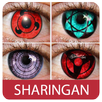
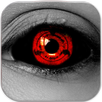
HD Eyes-Sharingan Shukaku Edit is the simplest app to apply Sharingan Eyes to your photos.
Simply take a photo using the app or import one and choose different sticker Sharingan eyes to apply from.
**How to use HD Eyes-Sharingan Shukaku Edit :
Just open your image from gallery, drag uchiha sharingan to your eye and share it to your family and friends. Now you can choose more than one sharingan style like Mangekyo, Byakugan, Rinnegan
This isHD Eyes-Sharingan Shukaku Edit!.
Create amazing photos like Sasuke Uchiha or Kakashi Hatake with this app, add your favourite Rasengan, Chidori energy, Rasengan Shuriken. Drag it to your favourite photos, share with your friends.
★ Intructions of using HD Eyes-Sharingan Shukaku Edit ★
• Open image from gallery
• Choose your favourite Sharingan eyes
• Drag it to your eyes
• You can resize and rotate it use two finger
• Share your photo to your friends
• Save on your gallery if you want
Get this app now while it's FREE.
Latest Version
1.0Uploaded by
Steven Steel Steven
Requires Android
Android 2.3.2+
Category
Free Entertainment AppContent Rating
Everyone
Report
Flag as inappropriateLast updated on Jan 1, 2017
Minor bug fixes and improvements. Install or update to the newest version to check it out!




APKPure - A multi-platform app store primarily focused on Android, providing extensive app-related content. Discover the app you want easier, faster, and safer, with quick and efficient downloads and installations.