Long Press on Here Map, Find more function.
What's better function at that?
1. easy to find a good route (from A place to B Place)
2. click Ruler (right-bottom second button), then click the map area.You can easily get the distance. It is good to measure the distance.
Function :
1. Fast check/edit photo's GPS information.
2. Fast check photo's camera information.
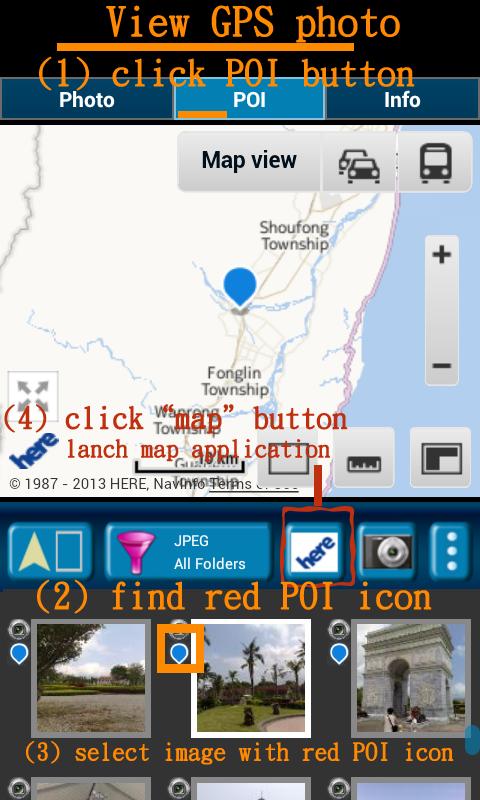
3. Navigate GPS-POI in here map.
4. When launch this application, the final selected photo will be shown. So it is quickly to index the final selected photo. It is convenient!
Purpose :
1. You can copy your GPS photos to your friends, and then they can go there if they are interest.
2. Want to know where to take the picture. (Take a GPS photo when park your car, you will find your car easily.)
3. Want to know the "focal length", "aperture", "ISO" value in the photo.
How to edit photo's latitude/longitude?
1. Support edit photo's latitude/longitude. (Only JPEG file can edit latitude/longitude)
(a-1) Press the small photo a long time to enable photo multi-select.
(a-2) Select photos. (up to 20 photos)
(a-3) Select option button, then tap "edit poi" button to enter edit-page.
【PS】
Please like us on Facebook. Give us the power of love.
https://www.facebook.com/jkfantasy
Latest Version
1.0.4Uploaded by
Mathew Harrison
Requires Android
Android 2.3.2+
Category
Free Travel & Local AppContent Rating
Everyone
Report
Flag as inappropriateLast updated on Aug 1, 2015
Fix Google Earth Map launch(Map button) if you have install the Google Earth Application.





APKPure - A multi-platform app store primarily focused on Android, providing extensive app-related content. Discover the app you want easier, faster, and safer, with quick and efficient downloads and installations.












