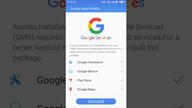

Google Apps Installer addresses situations where a Meizu device does not have essential Google services. It guides you through installing the core Google suite so apps can sign in and sync correctly. This reduces setup friction, and it helps standard apps function as expected on your phone. With clear prompts, you complete installation without extra tools. Users looking for a straightforward path can get the Google Apps Installer APK and follow simple steps to finish setup.
Simple setup on Meizu devices
First, Google Apps Installer lets you install the core Google apps in one place. You avoid manual package hunting, and the process is guided step by step, so setup feels straightforward on Meizu smartphones.
Core services included
Google data sync and account sign in
Next, once installation completes, you can sign in with your Google account and enable data sync for supported apps. This ensures apps that rely on Google services can authenticate and sync data properly.
Android 4.0 and above
Finally, it is designed for devices running Android 4.0 or higher. For better compatibility on newer phones, use the Google Apps Installer latest version when available.
This installer adds core Google services to Meizu devices with clear guidance. To begin, download Google Apps Installer and follow the on screen steps until setup finishes. After installation, sign in with your Google account and confirm data sync for your apps.
Latest Version
4.4.8Uploaded by
Meizu
Requires Android
Android 4.4+
Category
Free Tools AppReport
Flag as inappropriateLast updated on Sep 5, 2024
Minor bug fixes and improvements. Install or update to the newest version to check it out!


APKPure - A multi-platform app store primarily focused on Android, providing extensive app-related content. Discover the app you want easier, faster, and safer, with quick and efficient downloads and installations.