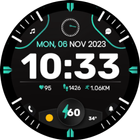
General: Digital Watch Face for Wear OS
For someone who values a traditional and timeless appearance, this watch face style is ideal. With a clean, easy-to-read display and a basic, attractive style, the General Watch Face style is ideal for daily wear. Any outfit will look great thanks to the color combination's sleek and contemporary appearance.
Features:
📅 Date
🔋 Battery
👣 Step count
🛣️ Step distance
☀️ AOD Mode
📱 Customizable Complication
Shortcut:
🎵 Music
✉️ Message
📞 Phone
⏰ Alarm
To modify the styles and manage the custom shortcut complication, tap and hold the watch face and select the "customize" menu (or settings icon under the watch face).
You can use a 24-hour or 12-hour style by going to your phone's date and time settings, where it is an option. After a short wait, the watch will sync with your changed settings.
Enable the "Always On Display" mode in your watch's settings to show a low-power display while idle. This feature will require more batteries, so please be aware of it.
Support all Wear OS devices with API Level 28+ such as:
- Samsung Galaxy Watch 4
- Samsung Galaxy Watch 4 Classic
- Samsung Galaxy Watch 5
- Samsung Galaxy Watch 5 Pro
- Samsung Galaxy Watch 6
- Samsung Galaxy Watch 6 Classic
- Casio WSD-F30 / WSD-F21HR / GSW-H1000
- Fossil Wear / Sport
- Fossil Gen 5e / 5 LTE / 6
- Mobvoi TicWatch Pro / 4G
- Mobvoi TicWatch E3 / E2 / S2
- Mobvoi TicWatch Pro 3 Cellular/LTE / GPS
- Mobvoi TicWatch C2
- Montblanc Summit / 2+ / Lite
- Suunto 7
- TAG Heuer Connected Modular 45 / 2020 / Modular 41
Installing the Watch Face:
1. Download an app to your phone.
2. Launch the Play Store app on your watch
3. Click on Apps on Your Phone
3. Download Watch Face From There.
Latest Version
Varies with deviceRequires Android
Category
Personalization AppContent Rating
Everyone
Report
Flag as inappropriateLast updated on Jul 23, 2024
This release includes minor bug fixes and general improvements. Update to the latest version for the best experience.



APKPure - A multi-platform app store primarily focused on Android, providing extensive app-related content. Discover the app you want easier, faster, and safer, with quick and efficient downloads and installations.









