GarageBand turns iPhone and iPad into a complete studio for sketching ideas and finishing tracks. You can record multiple parts, arrange a full song, and apply studio effects in a clear touch interface. It is an Apple app for iOS, iPadOS, and Mac, and it does not have an official Android or Windows release. Therefore there is no official GarageBand APK. On APKPure, you can stay informed, explore credible music makers for Android, and learn practical tips that help you decide the best workflow before you download GarageBand on an Apple device.
Live performance ideas with loops
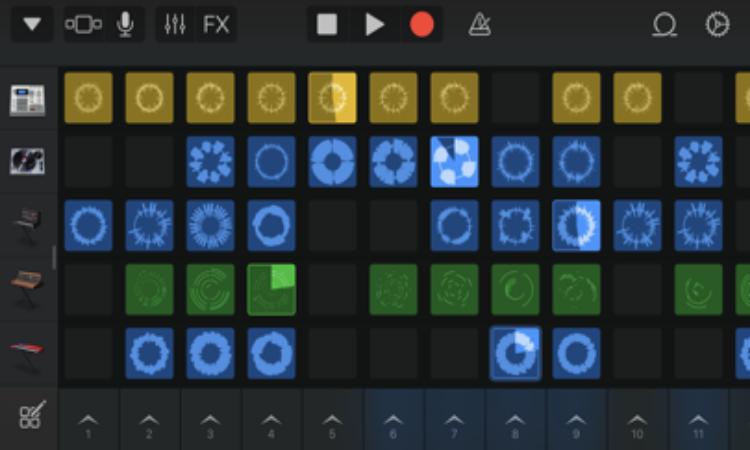
GarageBand provides a grid of loop cells that you can tap to build ideas in real time. You can record those ideas into a timeline and add simple performance effects for transitions. This lets you capture a clear structure before you commit to detailed editing.
Touch instruments and plugin support
You can play keyboards, synths, beat sequencers, and use the built in mic to capture vocals and instruments. GarageBand also supports Audio Unit Extensions, so compatible third party instruments and effects appear inside your projects. This makes it easier to expand your sound without leaving the app.
Virtual drummers for instant grooves
GarageBand includes realistic drummers that follow your arrangement and respond to feel controls. You adjust complexity, kit pieces, and fills to match your song. As a result, you can build a tight rhythm section fast without programming every hit.
Smart instruments for quick chords
Smart Strings, Smart Guitar, and Smart Bass use chord strips and automatic patterns. You select a key and style, then tap to create convincing parts even if you do not play those instruments. This helps you draft harmonic sections before recording final takes.
Multitrack recording and mixing tools
GarageBand records up to 32 tracks with multiple takes, so comping a clean performance is straightforward. You can shape tones with Visual EQ, saturation, and automation while monitoring levels in real time. Finally, you export mixes at 24 bit quality for use in other workflows.
Sound packs and sharing options
You download free sound packs to expand instruments, loops, and presets. GarageBand lets you share songs, make ringtones, and sync projects through Apple services when you move between devices. This keeps your work organized across sessions and devices.
GarageBand is made by Apple for iPhone, iPad, and Mac. There is no official version for Android or Windows, and there is no official GarageBand APK. On APKPure, you can follow this page for updates, learn about features, and find safe Android alternatives if you need a mobile studio on a different platform.
GarageBand supports VoiceOver and Voice Control so you can navigate the interface with spoken commands. The app offers a dark interface option, settings to differentiate without color, and caption support where relevant. These tools help more creators record and arrange music comfortably.
According to Apple’s disclosures, GarageBand may use a device identifier for personalization and uses audio data and a device identifier for app functionality. You can review permissions on your device and adjust access to the microphone, files, and network as needed. Managing these options gives you clear control over data use during creative work.
GarageBand does not offer a browser based version. If you search for GarageBand online, you will find information pages and tutorials rather than a web studio. For official details, Apple hosts product pages and support guides, while APKPure focuses on clear descriptions, practical tips, and safe options for Android users who need an alternative.
Use this quick guide to record a first idea and turn it into a shareable song. Follow the steps, then repeat with your own sounds and structure.
GarageBand brings a complete music studio to Apple devices with clear tools for loops, instruments, and mixing. There is no GarageBand APK latest version because the app is not released for Android. Follow this page on APKPure to stay informed, discover safe alternatives for Android, and decide the best path before you download GarageBand on an Apple device.
Is there a GarageBand APK for Android?
No, there is no official GarageBand APK for Android. GarageBand is an Apple app for iPhone, iPad, and Mac only. On APKPure, you can follow this page for updates and explore trusted Android music maker alternatives if you need similar features on your device.
Can I download GarageBand without Apple’s official channels?
No, GarageBand is distributed only by Apple on its own platforms. There is no safe way to get a GarageBand APK latest version because such a file does not exist officially. APKPure helps you verify this information and find secure Android options for music production.
Is a GarageBand Android mod APK safe to install?
No, a GarageBand Android mod APK is not safe and is not an official build. Modified packages can include malware, violate device policies, and fail to update. APKPure recommends avoiding these files and choosing verified Android apps that offer recording, loops, and mixing features instead.
Does GarageBand work on Windows or in a web browser?
No, GarageBand does not have a Windows version and it does not run in a browser. If you need a desktop workflow on Windows, consider other DAWs. For mobile creation on Android, APKPure lists reliable alternatives that cover multitrack recording and loop based production.
What is the best way to get started if I am new to GarageBand?
Start with a simple project using a loop grid or a drum and bass foundation, then add one instrument at a time. GarageBand keeps the interface simple, so you can record short takes, try multiple versions, and use Smart Instruments to create chord parts without prior training. When the idea works, mix with EQ and export a draft for feedback.
Latest Version
1.0Uploaded by
Pana Qaladza
Requires Android
Android 5.1+
Category
Free Video Players & Editors AppContent Rating
Everyone
Report
Flag as inappropriateLast updated on May 10, 2021
Minor bug fixes and improvements. Install or update to the newest version to check it out!



APKPure - A multi-platform app store primarily focused on Android, providing extensive app-related content. Discover the app you want easier, faster, and safer, with quick and efficient downloads and installations.