With FuriganIt you can easily get kanji reading inside any app or website - just select or copy text. And all of that can be done without internet connection.
You can use it in two ways:
1. Get furigana from copied text - copy any text and press button in app's notification
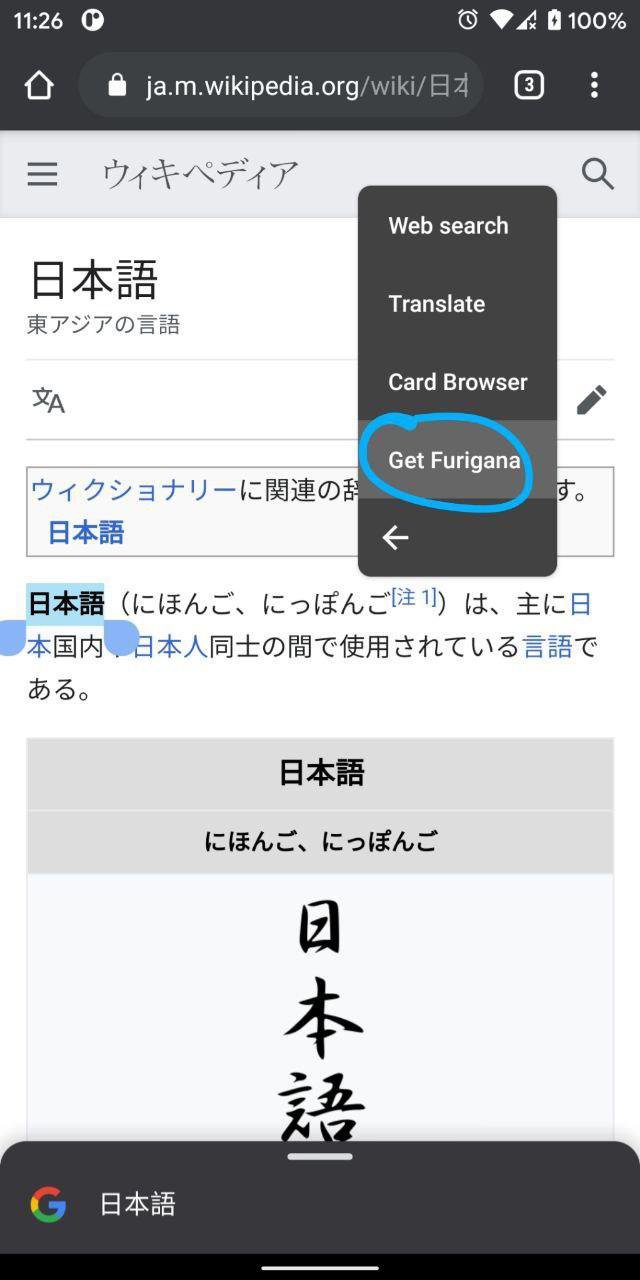
2. Select japanese text and click on 'Get furigana' option inside popup system window
FuriganIt use libraries: kuromoji-core, kuromoji-ipadic
Source code available:
https://github.com/SYtor/FuriganIt
Latest Version
1.2Uploaded by
Carlos Piña
Requires Android
Android 5.0+
Category
Free Education AppContent Rating
Everyone
Report
Flag as inappropriateLast updated on Oct 25, 2021
Full internal logic update
Support of Android 10 and 11





APKPure - A multi-platform app store primarily focused on Android, providing extensive app-related content. Discover the app you want easier, faster, and safer, with quick and efficient downloads and installations.










![Wifi Password [Root] APK](https://image-eo.winudf.com/v2/image1/dWEuc3l0b3Iud2lmaXBhc3NfaWNvbl8xNTkxMjIzMDAwXzA1NA/icon.png?w=102&fakeurl=1)