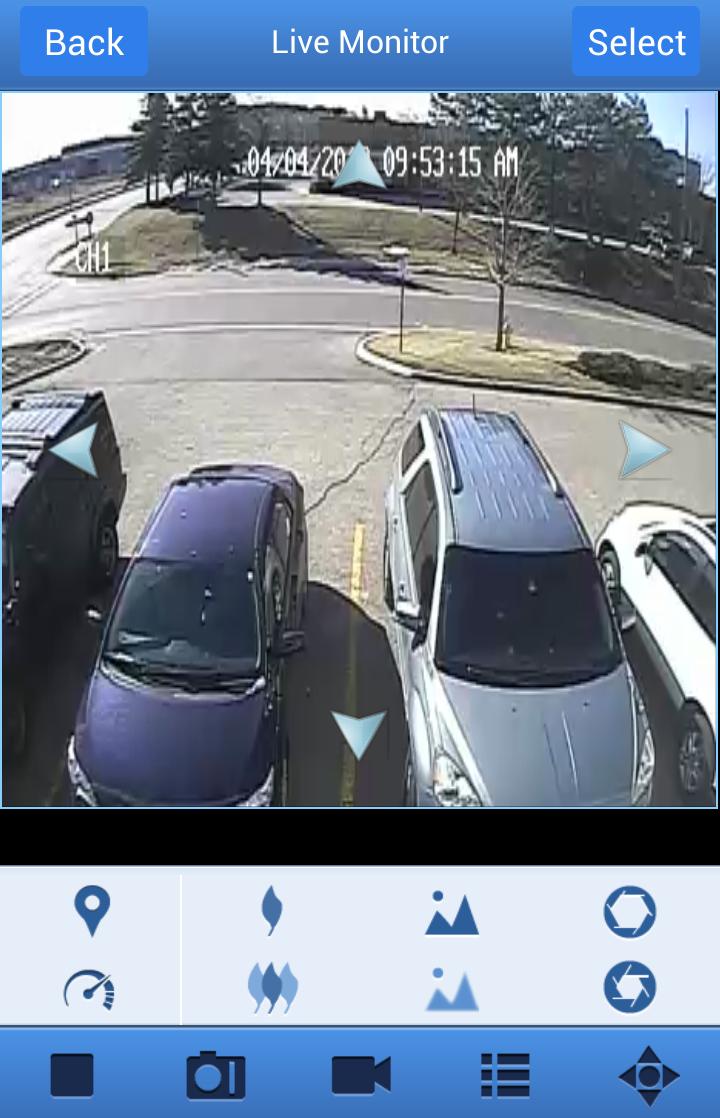
Digi Summit enables you to connect to your FLIR D3000 Series DVR using your Android device.
The app allows you to:
View multiple cameras live.
Search & playback recorded video saved on your DVR hard drive.
Save snapshots and video directly to your device.
Control PTZ cameras from your phone or tablet.
Notes:
Android v2.3 and higher supported
Before you can connect, you must complete port forwarding for ports 80 and 9000 to the DVR’s IP address and register for a free FLIR DDNS account at http://ddns.myddns-flir.com.
For detailed instructions, see the Quick Networking Guide included with your product or on www.digimerge.com.
Dernière version
2.0.2.0Telechargé par
Davi Saturnino
Nécessite Android
Android 2.3.2+
Catégories
Gratuit Professionnel APPLICATIONClassification du contenu
Everyone
Signaler
Signaler comme inappropriéLast updated on Sep 7, 2015
• Improved app performance
• Additional split-screen views
• Simplified setup process
• Added Help instructions
NOTE: To improve the security of the product, if you are using the default DVR password (000000), you will be prompted to create a personal password for your system. The new password will need to be entered from now on to connect using other devices or to log into the DVR locally.



APKPure - Une boutique d'applications multi-plateforme principalement axée sur Android, offrant un vaste contenu lié aux applications. Découvrez l'application que vous souhaitez plus facilement, plus rapidement et en toute sécurité, avec des téléchargements et des installations rapides et efficaces.





















![Comment télécharger la dernière version de Google Play Store APK 42.0.20-23 [0] [PR] 654119317 pour Android 2024](https://image.winudf.com/v2/image/YWRtaW5fR29vZ2xlLVBsYXktU3RvcmUtNi4xLjEyLUFQSy5wbmdfMTUxMzA2Nzg1ODQzOQ/banner.jpg?fakeurl=1&w=192)