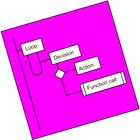
Designed for anyone wanting to design a process, or a complex algorithm, such as planning the "edge cases" of a UI.
The Flowchart is reborn with the new simple Standard Notation.
Add and Move steps with drag n drop. For those users who prefer not to drag their fingers across their tablet's screen, the user-interface also works equally well with Point-n-Tap.
You tell the app which steps, and their order: it draws the perfect flowchart.
A Flowchart is a tree of Steps. Coders will instantly be familiar with any flowchart, because they now flow just like their code.
A Step is either a Loop, a Decision or an Action (or Async Action for coders).
Flowcharts can be linked (Function Call steps).
Every step can be annotated with Text and an Image.
Your step annotations get collated and added to your generated Pdfs.
Your flowcharts are saved on your device, and can be sync'd to our Cloud, allowing you to access them from all your devices.
Latest Version
1.0.0Uploaded by
ام زيد قراقيش
Requires Android
Android 11.0+
Category
Free Productivity AppContent Rating
Everyone
Report
Flag as inappropriateLast updated on Sep 3, 2022
Making the app even more robust by implementing several recommendations made by the Play Store. Functionality and features unchanged.



APKPure - A multi-platform app store primarily focused on Android, providing extensive app-related content. Discover the app you want easier, faster, and safer, with quick and efficient downloads and installations.