Getting start here : http://goo.gl/6KQ2Yj
** NOTE : This app does NOT encrypt data. Store sensitive data in clipboards is NOT recommended.
If you are using Xposed framework , check this out : XTextList in Xposed repo
http://repo.xposed.info/module/tw.darkk6.xposed.xtextlist
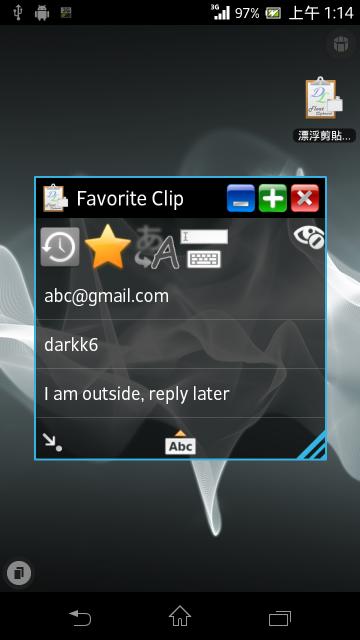
This App can help you quick copy some text from list ( I call it "Clip" in this App ) that you've pre-created.
Just copy and paste anywhere you need.
And more five helpful feature :
1. Floating Window - Floating window on the top.
2. Minimize automatically - Minimize automatically after copying text.
3. Quick input - Type words on floating window. Convenient when using full screen App.
4. Share Text -Quick store text from other App via "Share text"
5. History- Record all text you've copied. ( Android 3.0+ )
Android 2.2+ required.
Hint : With "Notification Toggle"(by j4velin) App , you can add shortcut and launch Floating Clipboard in Notification bar. It's convenient for you to quick launch Floating Clipboard.
Hint : Xperia Users can launch Floating Clipboard from SmallApp Dock.
com.sony.smallapp,SmallApp,Clipboard,darkk6,Xperia,floating,float,sony
Small apps extension for Sony products
Latest Version
1.2.9Uploaded by
Pawan Mourya
Requires Android
Android 2.2+
Category
Free Tools AppContent Rating
Everyone
Report
Flag as inappropriateLast updated on Jul 21, 2015
v 1.2.9
- Add : Setting shortcut in App drawer
- Fix : Some device cannot restore Floating window *1
- Add : Provide Iconify restore adjust seek bar. *1
*1 :
Some device will not restore Floating Clipboard when clicking small/iconify "floating block". If your device has this problem, go to floating clipboard setting and increase " Iconify restore adjust" value then try again. Find the best value for your devices.



APKPure - A multi-platform app store primarily focused on Android, providing extensive app-related content. Discover the app you want easier, faster, and safer, with quick and efficient downloads and installations.