
Scan Date:Apr 17, 2026
Show More
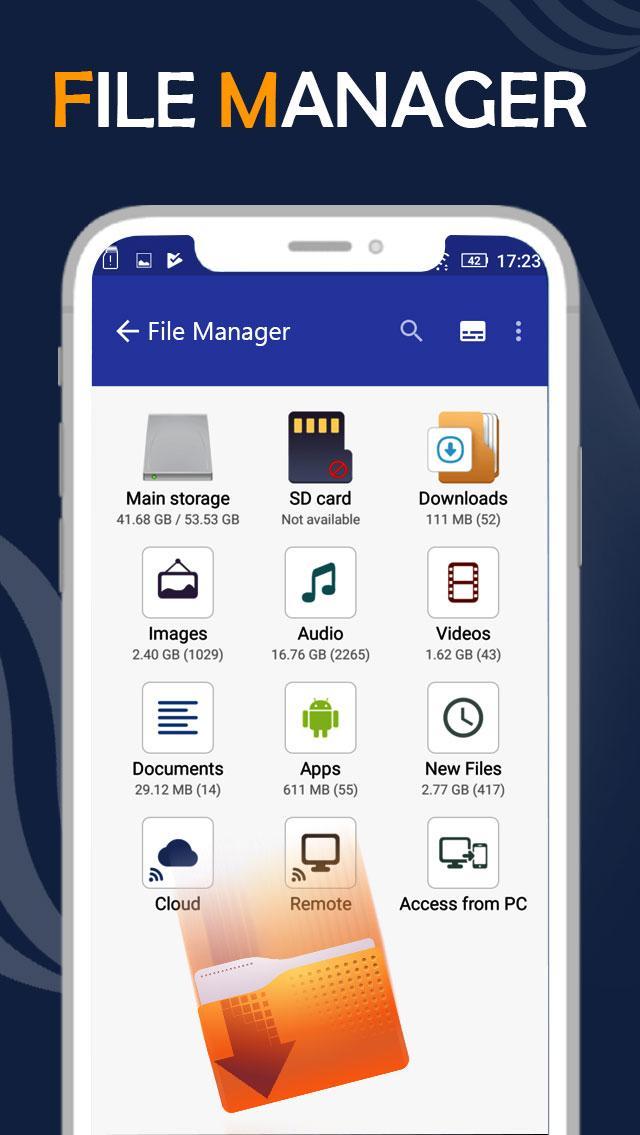
File manager app is free, really easy to use with file organizer by category: Images, Music, Movies, Documents, Apps,...
File manager is the best file explorer, file tool for android device manager with powerful features: Copy, cut, paste, rename, compress, transfer, download …
With this app manager for Android, you can easily manage your files and folders on device, manage local and remote/cloud storage.
This is the solid explorer files app, its so cool file manager android app that provides usage manager, storage manager and a lot of relevent features.
Manage your files (file explorer) like you do on your desktop or laptop using Multiple Select, Cut/Copy/Paste, Move, Create, Delete, Rename, Search, Share, Send, Hide, Create Shortcut, and Bookmark;
* Application Manager – categorize, uninstall, backup, and create shortcuts to your apps
* 3 sets of commercial icons for 80+ different file types, toolbar and menu items
* Multiple resolutions support
* Support 19 languages
* List and grid view for file explorer
* Compress and decompress support
* Search and share files
* Multiple selection and various sorting support
* Thumbnail for photo, video and APK files
* Support file shortcut on Home screen for easily access
* Basic features like cut, copy, delete, compress, extract etc. easily accessible
- Work on multiple tabs at same time
- SMB(windows) file sharing
- Multiple themes with cool icons
- Navigation drawer for quick navigation
- App Manager to open, backup, or directly uninstall any app
- Quickly access history, access bookmarks or search for any file
- Root explorer for advanced users
- and the list goes on...
Features of File Manager application:
- Browser files easily by category: documents and data, images, videos, music, applications, downloaded, and favorites.
- Manage all files and folders in local device storage, files and folders in SD Card. Browse file system, whole storage systems via the app
- Support Wi-Fi mode & created hotspot for file sharing
- Storage analysis: analyze local storages to clean up useless files.
- File transfer: Transfer apps, images, music, documents, movies via Wifi
- File manager: Manage your files with cut, copy, paste, rename, and compress operations from a microSD card, LAN, or Cloud storage
- Access file in LAN: Manage files within your LAN Wifi via HTTP
- More storage options via cloud storages: Supports cloud drive accounts such as Dropbox, Google Drive, One Drive, Box
- Images: Manage image and picture files your storages. Preview: bmp, gif, jpg, png...
- Audios: Manage music and sound related files. Audio formats: wav, mp3, ogg, es, flac, m4p, wav, wma...
- Sd card manager android tool: Tools for sd card manager like: usage volume, copy, cut, paste, move files & send to sd card
- Data manager & data transfer: file sharing using various tools: “send anywhere”, email, sms, … & file transfer to PC via http file transfer protocol
- Cloud storage: fileshare by creating a shere link, file upload from local to cloud
- File search: search for file & folder
Currently this app supports the following languages which have been translated:
English, Arabic, Russian, French, Spanish,Hungarian, Greek, Czech, Swedish, Dutch, Hebrew, Japanese, Simplified Chinese, Traditional Chinese, Turkish, Polish, German, Portuguese, Korean, Hindi, Finnish
If you have any query or suggestions about this application feel free to inbox us direct via E-Mail.
Hope you will Enjoy it!
Latest Version
1.6Uploaded by
Hope Wee
Requires Android
Android 6.0+
Category
Free Tools AppContent Rating
Everyone
Security Report
Report
Flag as inappropriateLast updated on Apr 17, 2026
All New Experience of File Manager File Explorer app
Ui Changed...
Bug Fixed...





APKPure - A multi-platform app store primarily focused on Android, providing extensive app-related content. Discover the app you want easier, faster, and safer, with quick and efficient downloads and installations.