Multi Window : Split Screen (Multi Tasking)
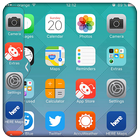
Now you can use two apps or more than two apps at a single screen.
You can use multiple apps at a time in a Screen and no need to switch tasks.
This app makes all apps multi window capable, but only adds the ones you specify to the launch tray. This means you can drag an app from the launch bar onto ANY app and it will launch in split screen...even apps that aren't explicitly selected to be enabled for multi window.
Multitasking is composed by the settings menu, the sidebar and the floating tools. To access the tools bar do a swipe gesture to the right.
Side Bar Multi Window is a free application to provide you the ease of accessing your applications from anywhere. It is just a side launcher with your favorite applications. Shortcuts of your selected favorite applications will be created on the left of the screen
>> No root required
>> Long press on item and drag drop for re-arrange icons.
>> You can use both sides tray left and right.
>> You Can Change text color,text size and text visibility.
>> You can Change Slider Layer default themes and
customized slider layer background color (By Color Picker).
>> You can customize animation speed of slide bar.
>> You can change size and opacity of tab button.
>> Easy to use and smooth.
How to use it?
? First add shortcuts to the bar.
? Then swipe task bar from the edge of the screen.
? After that simply click a shortcut icon to quickly switch between current task and another task.
That's all you have to know.
Multi Window Manager Is the app by which we can An App By Which You Can Create Shortcuts Of Your Installed Apps Icon Into Multiple Window Tray. And By Clicking On These Shortcuts, You Can Easily Switch From One Task To Another During Your Current Task.
This window system if you wish, zoom to full screen operations minimized by bringing the screen if you wish, you can use efficiently.
For the applications those can be launched in multi window mode, you can create shortcut for any two applications those would be launched upon shortcut tap and they will turn to multi window mode.
An application to make your android experience better, provides easy multitasking from anywhere and anytime!
Using Multi Window Sidebar – Favorite Apps you can add your favorite apps and games to the sidebar where you can access them from any screen.
Types: Most used app, Recently used app and Alphabetical Order.
* You Can Select Many Different Default Themes.
* You can hide and unhide On long pressing multi window Sidebar icon. (Follow Help )
* You can change transparency of slide bar.
* Customize color, animation speed,order and opacity.
* Service start automatically when phone restart Fi
آخرین نسخه
1.1.1بارگذاری شده توسط
Khaing Khant Zaw
نیاز به اندروید
Android 4.0+
دسته بندی
رایگان برنامه ابزاررتبهبندی محتوا
Everyone
گزارش
گزارش محتوای نامناسبLast updated on 20/04/2019
Fix Some Bug.



APKPure - یک فروشگاه برنامه چند پلتفرمی که در درجه اول روی Android متمرکز شده و محتوای گسترده مربوط به برنامه را ارائه می دهد. برنامه مورد نظر خود را آسانتر ، سریعتر و ایمن تر با بارگیری و نصب سریع و کارآمد کشف کنید.