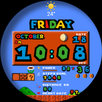
WATCH FACE INSTALLATION NOTES:
Check your watch's compatibility with WEAR OS before proceeding with the installation.
(Note: Galaxy Watch 3 and Galaxy Active are not WEAR OS devices.)
✅ Compatible devices include API level 30+ Google Pixel, Galaxy Watch 4, 5, 6, 7 and other Wear OS models.
🚨 Watch faces don't automatically apply on your watch screen after the installation.
That's why you MUST set it on your watch's screen.
Features:
- effect Notification message
- Hybrid Styles (12/24 Hour Time format)
- Date , Day of week , Month , Moon Phase
- complication (editable)
- Steps Count , Heart Rate , Battery Level , Count message unread
- Switching Between MILE / KM (Auto)
- Shortcut Steps day
- Shortcut Heart rate / Heart rate (Zone)
- Shortcut Settings
- Shortcut Phone
- Shortcut Music
- Changeable Colors
- Changeable backgrounds
- Effect 15% low battery red color
Customization:
1. Touch and Hold Display
2. Tap on Customize Option
Complications:
You can customize with the any data you want.
For example , you can select weather , world clock , sunset/sunrise , barometer etc.
**Some features may not be available on some watches.
For further support, please contact: ejimatsus@gmail.com
Thank you for Your support.
Latest Version
1.0.0Requires Android
11
Category
Personalization AppContent Rating
Everyone
Report
Flag as inappropriateLast updated on Jan 15, 2025
This release includes minor bug fixes and general improvements. Update to the latest version for the best experience.




APKPure - A multi-platform app store primarily focused on Android, providing extensive app-related content. Discover the app you want easier, faster, and safer, with quick and efficient downloads and installations.