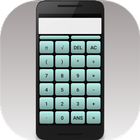
A simple calculator that carries out the basic operations of arithmetic. The buttons of the calculator are cleary layed out, making entering calculations a simple task.
As well as the four basic mathematics operations the calculator can carry out square roots and powers. There are buttons to include your previous answer in the next calculation as well as the constant pi. Brackets can be used to enter more complex calculations.
The calculator follows the usual BODMAS rules for order of operations. There is no limit to the size of the calculation being entered and the top half of the screen can be scrolled horizontally to both review and edit the input. The cursor position can be set by touching the screen or using the buttons just below the screen.
Although limited to basic operations, keeping the display uncluttered and simple to use, this is a robust calculator giving accurate results up to at least 10 significant figures.
Please note that √25𝜋 will be interpreted as the square root of 25 then multiplied by pi. To find the square root of 25𝜋 you must use brackets i.e. √(25𝜋) also the calculator will apply a left to right order of calculations for operations of equal precedence, including for powers, i.e a^b^c is equivelant to (a^b)^c
آخرین نسخه
2.1بارگذاری شده توسط
Caique Santos
نیاز به اندروید
Android 4.1+
دسته بندی
رایگان برنامه ابزاررتبهبندی محتوا
Everyone
گزارش
گزارش محتوای نامناسبLast updated on 25/04/2016
Calculation being entered is now fully editable. As well as scrolling the calculation, when it is larger than the screen, you can also tap to set the cursor position for editing. The cursor can also be moved with the two buttons just below the screen.



APKPure - یک فروشگاه برنامه چند پلتفرمی که در درجه اول روی Android متمرکز شده و محتوای گسترده مربوط به برنامه را ارائه می دهد. برنامه مورد نظر خود را آسانتر ، سریعتر و ایمن تر با بارگیری و نصب سریع و کارآمد کشف کنید.