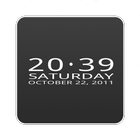
Minimal Clock Widget. 6DOT7 BLOCK CLOCK LITE is a minimalistic and sleek designed home screen digital clock and date widget with size of 4x1. You can usw it for your home screen or also lock screen. It's designed battery friendly. Support device language and work with Jelly Bean.
Use this lite version to check before buy. Full version with app launcher for alarm clock, calendar or any app you like.
--- Now with new font style (full version) ---
More great clock widgets, here on Google Play:
☞ http://goo.gl/XY5rx
HOW TO:
App launcher for time and date(weekday). The first time you tap on 'time', you will see a list of your applications. Select an application (Alarm Clock, Calendar, ...), that will launch next time. Do it same for weekday/date.
PLEASE NOTE:
* If you're using killer apps, add the service ClockUpdateService to the ignore list.
* This is a homescreen widget and not a regular application: It does not "run" from the Applications Drawer, in fact you won't even find its icon there, when the install completes.
To put the widget on your homescreen:
➀ Long press empty space
➁ Select Widgets (see screnshot #4)
➂ Select BlockClock (see screnshot #5)
Thanks for your comments and also check out other great and best clock widgets by sixdotseven, here on the market!
Última Versión
1.1Presentado por
Pandu Mua'fi
Requisitos
Android 1.6+
Categoría
Gratis Personalización APPClasificación de contenido
Everyone
Reportar
Marcar como inapropiadoLast updated on 09/10/2015
* customizable tap launcher for time and date(weekday). The first time you tap on 'time', you will see a list of your applications. Select an application, that will launch next time. Do it same for weekday/date.
* landscape mode optimized
* more stability for the tap launcher
* trial period extened (trial version)
* hint: trial period will reset when BLOCK CLOCK move from homescreen (trial version)



APKPure - Una tienda de aplicaciones multiplataforma enfocada principalmente en Android, que proporciona un amplio contenido relacionado con aplicaciones. Descubre la aplicación que deseas de forma más fácil, rápida y segura, con descargas e instalaciones rápidas y eficientes.