!!!! Make sure that you have a controller before you download!!!!!
For more information about controllers visit: http://emulated.southpac.co/controllers
Ask questions here: http://bit.do/emutd
For updates on v2, follow us on twitter: @Southpac_co
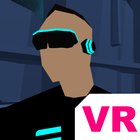
Emulated: Pylons VR is the first of the series of VR games designed for mobile devices using Google Daydream (Cardboard) technology. Please note that Daydream controller is not compatible for this game.
Game is set in future when humanity exists in a cyberspace. As an operative you are assigned a mission to capture communication pylons in a city infested by Vektorbots.
Version 1 includes 6 missions with unique maps + Training mission.
Features:
- Story driven game
- Advanced, futuristic shooting
- Elements of quest
- Cyber punk style graphics and environment
- Most remote bluetooth controllers supported
- Gamepad buttons wiring system
Works well with:
- Google Daydream view (with NFC disabled)
- Homido VR
- Xiaomi Mi VR Play
- BOBOVR
- VR BOX
- Zeiss One Plus
- Freefly VR
- FIIT
- Shinecon
How to play
Cardboard:
1. Make sure that you have the Controller connected and paired (Connecting controller)
2. Launch the EMULATED: Pylons VR and click on "Controller Setup"
3. Follow the instructions on screen to set up your controller
Daydream:
1. Daydream controller is not supported so you would need to have 3rd part bluetooth controller
2. Make sure that you have the Controller connected and paired (Connecting controller)
3. Turn off the NFC on your phone to be able to launch cardboard app in Daydream View (Playing Cardboard apps on Daydream View)
4. Launch the EMULATED: Pylons VR and click on "Controller Setup"
5. Follow the instructions on screen to set up your controller
Enojy!
Latest Version
3.0.12Uploaded by
Maged Atya
Requires Android
Android 4.4+
Category
Free Action GameContent Rating
Everyone
Report
Flag as inappropriateLast updated on Feb 17, 2018
Optimised soundtrack and lighting
Misc. bug fixes




APKPure - A multi-platform app store primarily focused on Android, providing extensive app-related content. Discover the app you want easier, faster, and safer, with quick and efficient downloads and installations.