★Distance Meter allows you to measure the approximate distance and height of an object using your phone's camera.
★To measure the distance, just stand up, target at the BOTTOM of the object.
★To measure the height, target at the TOP of the object.
*************************************
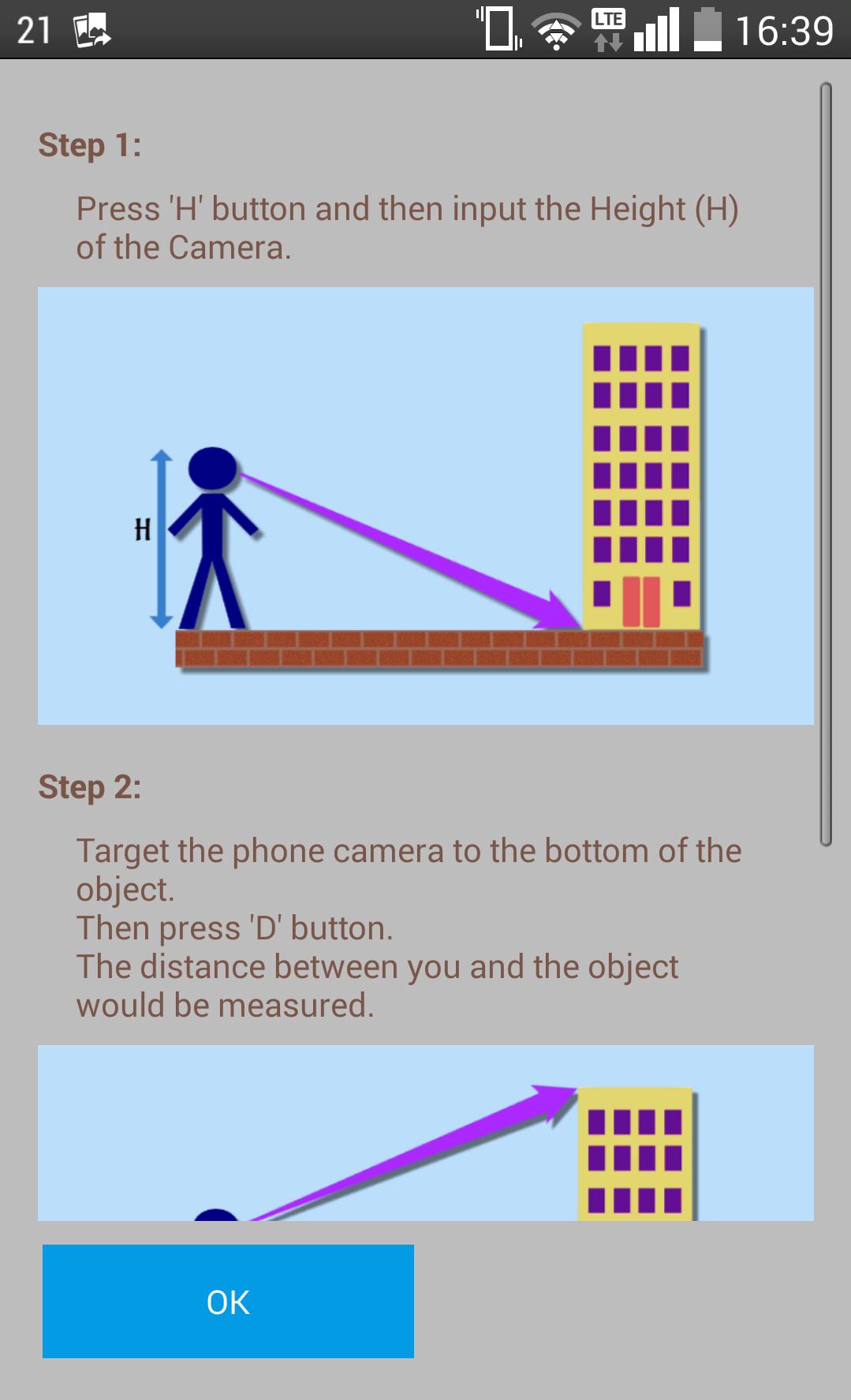
How to use Distance Meter?
Step 1. Press 'H' button and then input the Height (H) of the Camera from the ground.
Step 2. Target the phone camera at the BOTTOM of the object.Then press 'D' button. The distance between you and the object would be measured.
Step 3. Target the phone camera at the TOP of the object.Then press 'T' button. The height of the object would be measured.
Latest Version
1.9Uploaded by
Amine Krb
Requires Android
Android 4.0+
Category
Free Tools AppContent Rating
Everyone
Report
Flag as inappropriateLast updated on Oct 20, 2019
This release includes minor bug fixes and general improvements. Update to the latest version for the best experience.



APKPure - A multi-platform app store primarily focused on Android, providing extensive app-related content. Discover the app you want easier, faster, and safer, with quick and efficient downloads and installations.