Package Name:com.watchfacestudio.Digitalbasic4
SHA-256:b69d4aa1bc6ea550e5ea485d1be5259811be35ab271a8fcc03ff6f9a6f346117
Show More

=======================================================
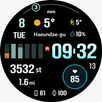
This watch face for WEAR OS 5+ supports 12/24H Both Versions. Leading Zero of Hours is Shaded in 24H. To select 12 or 24 H mode just simple change it on your connected phone from date and Time in settings menu of your phone and it will sync same
NOTICE: READ THIS ALWAYS BEFORE AND AFTER DOWNLOADING OUR WATCH FACE TO AVOID ANY SITUATION YOU DON'T LIKE. THE OUTLINE FONT IS ONLY ON AOD DISPLAY TO SAVE BATTERY. IT IS NOT FOR MAIN DISPLAY AND IS NOT SELECT-ABLE FOR MAIN DISPLAY.
=======================================================
This watch face for WEAR OS has been made in latest released Samsung Galaxy Watch face studio V 1.9.5 which is still evolving and has been tested on Samsung Watch Ultra ,Samsung Watch 4 Classic , Samsung Watch 5 Pro, and Tic watch 5 Pro. It also supports all other wear OS 5+ devices. Some feature experience can be slightly different on other watches.
b. DO NOT PAY TWICE FROM WATCH PLAY STORE . Wait for your purchases to be synced or if you do not want to wait you can always select direct install to watch method without even helper app.Just ensure that you select your connected watch in install button drop down menu where your wearable device will be shown.Just simply ensure that when you install from phone play store app to your connected watch.
Following features are available:-
1. Tap on Month text to open watch alarm settings menu.
2. Tap on Date Text will open Calendar app on watch.
3. Tapping Date text will open calendar app.
4. Tap Heart icon or text reading to open watch Heart Rate Monitor counter in Samsung Health App.
5. 2x Customizable Complications for main Display of watch face available via customization menu.
6. 3x Invisible Customizable Complications for main Display of watch face via customization menu.
Latest Version
Varies with deviceUploaded by
Rizky Adika
Requires Android
Category
Personalization AppContent Rating
Everyone
Security Report
Check Now
Report
Flag as inappropriateLast updated on Jan 25, 2023
V1.0.7 Change log:-
1. Watch face description updated.
2. Watch face rebuilt with latest Samsung Watch face Studio.
3. New color styles added.
4. Helper app updated.



APKPure - A multi-platform app store primarily focused on Android, providing extensive app-related content. Discover the app you want easier, faster, and safer, with quick and efficient downloads and installations.