INSTALLATION:
1. Please make sure you watch is connected to your phone via Bluetooth
2. You can also install this watch face by accessing the Google Play Store in the web browser in a PC or Laptop with the same account you made the purchase from to avoid double charge.
3. If PC/laptop not available, you can use the phone web browser. Head over to the Play Store app, then to the watch face. Click the 3 dots in the upper right hand corner then Share. Use the available browser, I suggest Samsung Internet app, login the account you made the purchase from and install it there.
4. You can also check the Samsung Developers video installing Wear OS watch face in so many ways: https://youtu.be/vMM4Q2-rqoM
Our watch face apps are thoroughly tested in a real device (Galaxy Watch 4 Classic) and are reviewed and approved by the Google Play Store team before publishing them. We love to share our work and make sure users will enjoy our watch faces.
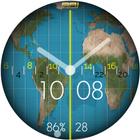
Simple Face with World Map scrolling to suit your time zone .
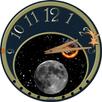
Ghost Image of Night time Behind.
No account made for DayLight Saving or Seasons but gives a Good Idea of the time of day your Friends Abroad are Enjoying.
Please enjoy!
CUSTOMIZATION:
1. Press and hold display then hit "Customize".
2. Swipe left and right to choose what to customize.
3. Swipe up and down to choose options available.
4. Hit "OK".
Note:
If Heart Rate is 0, you probably missed the Allow permission
in the first installation. Please try solutions below:
1. Please do this two (2) times - switch to another watch face and switch back to this face to enable the permission
2. You can also enable permissions in the Settings> Apps> Permission> find this watch face.
3. Also this can be triggered by a single tap to measure the heart rate. Some of my watch faces are still in Manual Refresh
Check out RAJ CoLab updates at:
Facebook page: https://www.facebook.com/RAJCoLab/
Developer page: https://www.facebook.com/RAJCoLab/posts/pfbid0vADxP7faf22jFd4NiZZsoydff6Rb28zLoUk5FMYf6pfBUbd7hravJDCfzCXQErmel
Latest Version
1.0.0Requires Android
9
Category
Personalization AppContent Rating
Everyone
Report
Flag as inappropriateLast updated on Apr 4, 2023
Minor bug fixes and improvements. Install or update to the newest version to check it out!



APKPure - A multi-platform app store primarily focused on Android, providing extensive app-related content. Discover the app you want easier, faster, and safer, with quick and efficient downloads and installations.