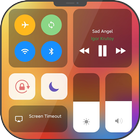
Control Center iOS 14 now come to Android, helps you quickly turn on/off settings, control music, media player, access to your favorite apps.
Flat & Modern design like IOS 15, X, XS, Pro Max
FUNCTIONS:
+ Quick settings : WIFI, BLUETOOTH, SCREEN ROTATION, Do not Disturb (DND) mode
+ MUSIC / MEDIA CONTROL: play & pause, next & previous track
+ Change Device BRIGHTNESS
+ Change system VOLUME, music Volume & alarm volume separately
+ Quick access favorite functions: FLASH LIGHT, CLOCK, CAMERA, CALCULATOR
+ Place your favorite apps
+ Easy capture SCREENSHOT with one tap
+ SCREEN RECORDING
How to use Control Center:
- If tap bar is located at the BOTTOM edge of the screen, swipe up from the bottom edge to open.
- If tap bar is located at the RIGHT edge of the screen,
swipe left from the right edge to open.
- If the tap bar is located at the LEFT edge of the screen, swipe right from the left edge to open.
To Close Control Center iOS 14:
- You can
Swipe up, swipe down, swipe right, swipe left or tap the top of the screen to close.
If you have any problems or questions with Control Center application, please contact me by email: smartworkoutstudio@gmail.com !
Latest Version
1.0.7Uploaded by
M Mazen Kh
Requires Android
Android 5.0+
Category
Free Tools AppContent Rating
Everyone
Report
Flag as inappropriateLast updated on May 11, 2021
Improve app’s stability



APKPure - A multi-platform app store primarily focused on Android, providing extensive app-related content. Discover the app you want easier, faster, and safer, with quick and efficient downloads and installations.