The Weather Channel supports everyday decisions when weather can affect your commute, outdoor plans, travel, or home routine. It gives Android users a clear place to follow changing conditions before leaving the house and while plans are already in motion. In addition, the app focuses on local weather information, so you can understand what is happening near you instead of relying only on broad regional updates. If you plan to download The Weather Channel, this overview helps explain what to expect before installing it.
Local forecasts for daily planning
The Weather Channel gives you hourly, daily, and up to 15 day forecasts, which helps you plan both immediate tasks and later activities. You can check expected temperature, rain chances, and changing conditions before choosing when to travel, exercise, shop, or work outside. As a result, the app is useful for simple daily choices as well as longer plans such as weekend trips or outdoor events.
Live radar and weather maps
The Weather Channel uses live Doppler radar and local weather maps to show rain, snow, storms, and other moving weather patterns. You can look at nearby conditions and follow how they are changing over time. This is helpful when the forecast says rain is possible, but you want to see whether the weather is moving toward your area or passing nearby.
Severe weather alerts and storm warnings
The Weather Channel sends severe weather alerts, storm warnings, and 3 hour forecast notifications for dangerous or difficult conditions. You can use these alerts to prepare for heavy rain, snow, storms, or other weather that may affect roads, power, or outdoor safety. For people living in storm prone areas, these updates can support faster decisions during changing weather.
Storm tracker and future radar
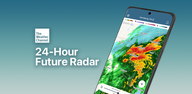
The Weather Channel includes 24 hour future radar, storm maps, and a storm tracker for following incoming systems. Instead of only checking the current sky, you can see how weather may develop later in the day. This can help during hurricane season, thunderstorm periods, or travel days when the timing and direction of a storm matter.
Health and comfort weather details
The Weather Channel also shows practical information such as air quality, allergy details, pollen levels, sunset times, and the “Feels Like” temperature. These details can matter when the weather affects breathing comfort, seasonal allergies, heat safety, or evening plans. In addition, widgets and dark mode support make it easier to check local conditions from your Android phone in a way that fits your routine.
The Weather Channel app is useful for users who want one place for forecasts, radar, alerts, and weather news. It may be especially helpful during storm season, allergy season, heat waves, or periods when local weather changes quickly. Some Premium options are also available, including ad free weather, advanced radar, and 15 minute forecast details, so users should review available options inside the app before choosing how they want to use it.
The Weather Channel APK can be considered by Android users who want access to local forecast tools and weather tracking features through APKPure. Before installing, it is useful to think about how often you need alerts, radar, or health related weather details. For example, a daily commuter may focus on morning forecasts and road weather, while a gardener, traveler, or outdoor worker may rely more on radar, pollen, and extended forecasts.
After installing The Weather Channel latest version, you can set up the app around your location and the type of weather information you check most often. The process is simple and works best when you allow the app to show local conditions and timely alerts.
The Weather Channel brings forecasts, radar, alerts, storm tracking, and daily weather details into one Android app. For users who need local updates before commuting, traveling, or planning outdoor activities, The Weather Channel download on APKPure provides a direct way to get started.
Official information is available through the following channels:
Latest Version
16.19.1Uploaded by
The Weather Channel
Requires Android
Android 9.0+
Category
Free Weather AppContent Rating
Everyone
Report
Flag as inappropriateLast updated on Aug 25, 2026
This release includes minor bug fixes and general improvements. Update to the latest version for the best experience.



APKPure - A multi-platform app store primarily focused on Android, providing extensive app-related content. Discover the app you want easier, faster, and safer, with quick and efficient downloads and installations.