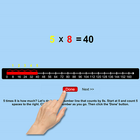
This program uses the number line to help the student understand multiplication. For instance, if the problem is 6 x 2 =?, the program will tell the student to Start at 0 and count 2 spaces to the right. Click on the last number you reached. (We call this a “jump”) Now start at the last number you reached, and make more jumps until you have 6 jumps. Then click the “Done” button. The answer (12) moves up into the missing space in the number statement, and the program voice says “six times two is twelve.”
Setting
Training
This option is selected by default. When this is selected, the program can be used to teach the student.
Test
Select this option to measure the student’s progress. The “Report” button under “Test” mode is enabled. The color prompts are disabled.
Report
This displays results of the Test.
Command Text
If this is selected then the verbal instructions given by the program voice will appear at the bottom of the screen.
Congratulatory Animation
This box is checked by default. This is available only for the “Training” mode. When this is checked, clicking the correct number invites a congratulatory animation. This animation runs for ten seconds. Click anywhere on the screen or press space bar to stop the congratulatory animation.
Select All
If this is selected, then any and all of the numbers in this box will be used. To deselect this choice, click it again and selection will be ended.
Congratulatory Animation
This box is checked by default. This is available only for the “Training” mode. When this is checked, clicking the correct action invites a congratulatory animation. This animation runs for ten seconds. Click anywhere on the screen or press space bar to stop the congratulatory animation.
Select Random Numbers
If this is selected, then the program will choose the numbers to be used in the problems.
Last updated on 2021年04月16日
此版本包含小幅错误修复和常规改进。请更新至最新版本,以获得更佳体验。