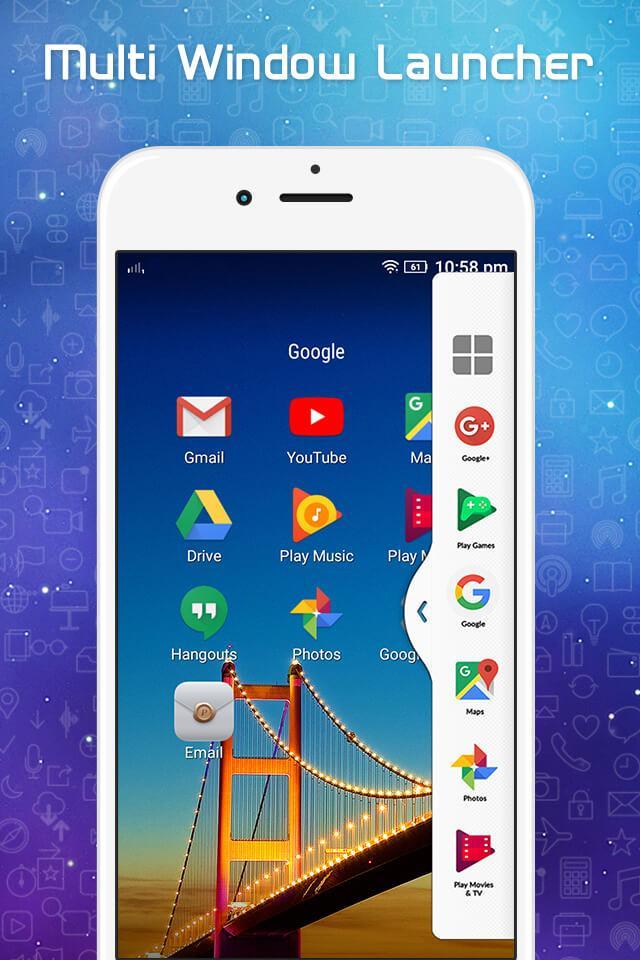
Multi Window & Computer Taskbar is an app by which you can create shortcuts for your installed apps into Multiple Window Tray which looks like computer taskbar. Multi Window & Computer Taskbar put a start menu, all installed app list, and recent apps. By clicking on shortcut icon you can easily switch from one app to another app.
Multi Window & Computer Taskbar adds recently used app icons into the taskbar and from taskbar you can easily manage app switching. This app also adds soft android navigation buttons like the back button, home button and recently used app button. Now Enjoy Computer launcher like taskbar experience on your android phone also. Install this free tool to create your favorite list of installed apps. This app has a start menu which shows you all applications installed on the device.
A user can easily customize the theme of application and also can change the color of the taskbar.
Feature:
* Pin an app to the taskbar -- Long click on the desired app and pin it to the taskbar.
* No root required.
* Change taskbar position -- You can easily change the position of the taskbar on any side of a mobile phone. It could be anything -- left vertical, right vertical, top horizontal, bottom horizontal.
* Taskbar -- shows your most recently used apps and lets you easily switch between them.
* Easy to use -- simple and effective UI.
* Absolutely free.
An application to make your android experience better and provides easy multitasking from any app and at anytime.
Try it once for knowing all features of Multi Window & Computer Taskbar.
*** NOTE ***
Feel free to ask any question and always ready to accept your valuable suggestions. Some functionality of this app is taken from the open source project. In case of any issue, please contact us.
Last updated on 2018年05月07日
此版本包含小幅错误修复和常规改进。请更新至最新版本,以获得更佳体验。