Fully compatible with Blue Iris 4.
Feel free to try, refund always available via email.
A brand new version of the Remote for Blue Iris (client app, not widget) is available here:
http://play.google.com/store/apps/details?id=com.rs.blueirisremote
****
Setup instructions: http://www.rspage.com/main/?p=90
If you get "Error getting snapshots" you need to uncheck the "secure only" in the Blue Iris server.
****
MAIN FEATURES
- Fully compatible with Blue Iris 4
- No additional apps required to be installed on you Android device to use this widget
- Stable, lightweight and fast
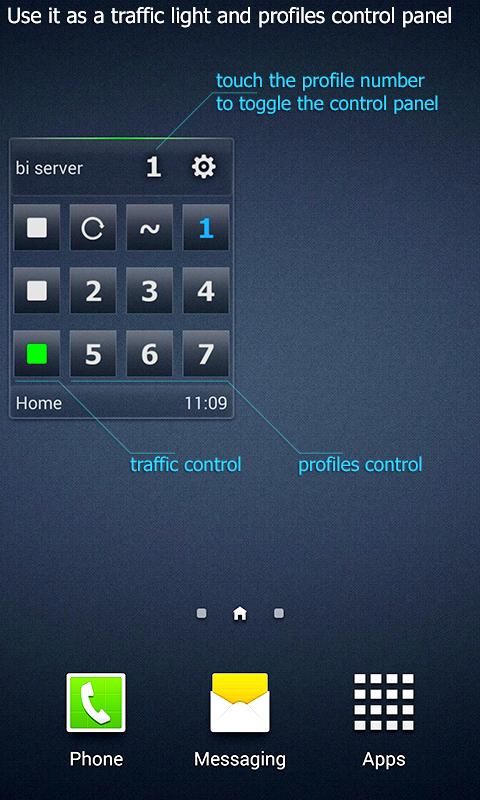
- Controls the traffic light, profiles and the schedule of Blue Iris
- Shows Blue Iris status and camera snapshots
- Live camera streaming on snapshot tap
- Connect to up to three different Blue Iris servers
- Automatic periodic refresh
- Customizable
- Choose from 3 different skins
- Built for convenience and daily use
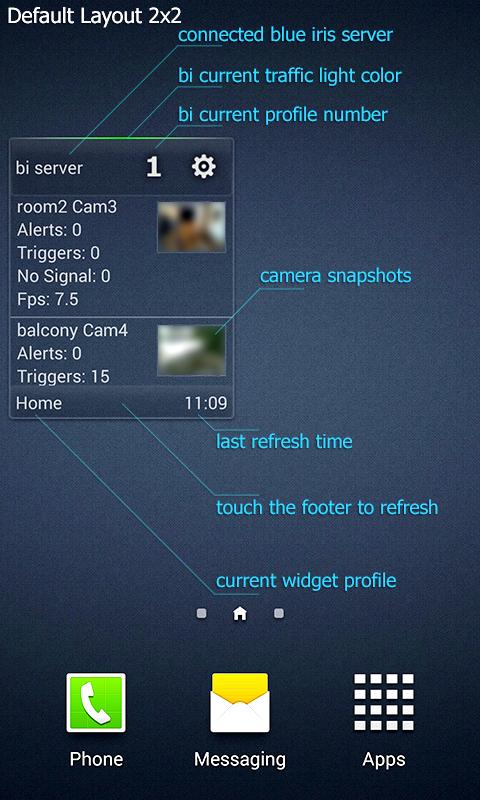
The top area of the widget displays the currently connected Blue Iris server name, selected profile number and a "glow bar" indicating the current color of the traffic light (red, yellow, green).
The middle area has three different functions:
1. Camera list - shows the camera snapshots from last refresh and important camera information. The camera snapshots can be increased or decreased in size, according to the needed widget layout. It is also possible to hide the camera snapshots from the list which will also prevent snapshot download and potentially save mobile data.
2. Control panel - can be accessed by touching the current profile number. The control panel shows and controls the currently selected profile and traffic light of the Blue Iris server. Switch to the desired profile with one touch from your home screen.
3. Information panel - can be accessed by touching the server name. The information panel will show information from your Blue Iris server as of the last refresh. Tip: in case you do not want to see a camera list on your home screen, turn off the snapshots, resize the widget to 2x2 and turn on the information panel for an elegant minimal widget.
The bottom area of the widget displays the current widget profile, the last refresh time and acts as a manual refresh button. Touch the bottom area of the widget at any time for immediate data refresh from the remote server. With widget profiles, you can define up to three Blue Iris servers and select the active one from the settings.
Notes:
- This widget requires Blue Iris installed on your PC.
- Read the set up instructions in the Settings > Instructions.
- Use novaross@gmail.com for suggestions, help and any other issues.
Last updated on 2018年07月14日
此版本包含小幅错误修复和常规改进。请更新至最新版本,以获得更佳体验。