

Jianying (剪映) supports users who record daily life, sell products, explain tutorials, or cut sports highlights. It focuses on quick editing on a phone, so you can arrange clips, add visuals, and finish a short video without complex steps. The interface keeps common actions easy to reach, and templates offer a simple starting point for first time users. With effects, text, and audio tools in one place, you can move from idea to export with fewer taps. For direct installs, many users search for Jianying (剪映) APK.
Quick trim, speed, and reverse
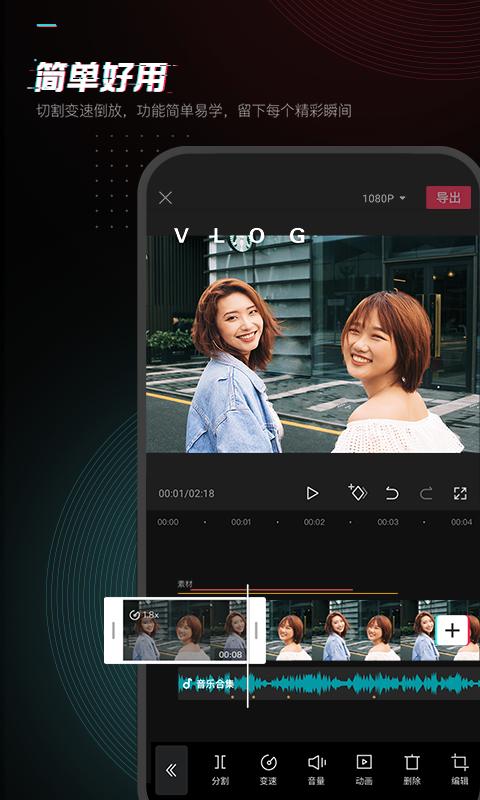
Jianying (剪映) lets you cut, split, and rearrange clips with basic gestures, so first edits take only a moment. You can change speed for slow or fast motion and flip a clip in reverse to add variety to a sequence. These timeline tools are placed near the playhead, which keeps the flow steady while you adjust timing. As a result, you can match beats, highlights, or voice pacing without leaving the main screen.
Stickers, fonts, and captions
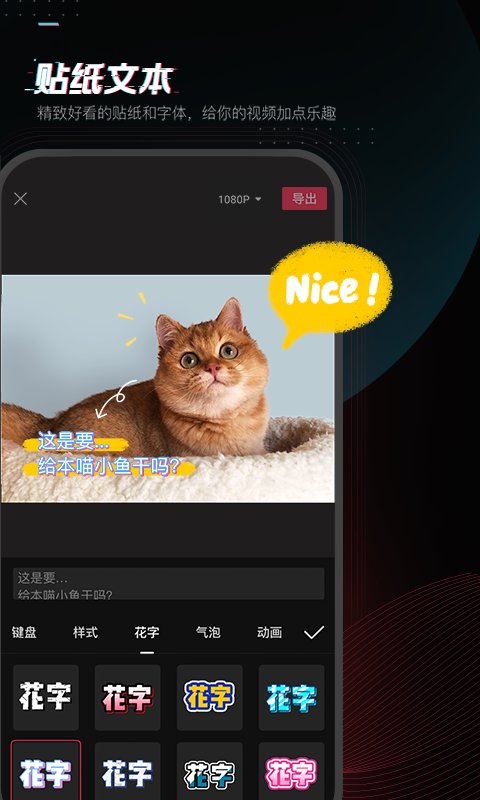
To enhance on screen expression, you can apply hand drawn style stickers and pick from multiple fonts and caption styles. Subtitles can be formatted to match the tone of a vlog, a product demo, or a quick explainer. Layer controls keep text and stickers aligned with the content, so labels and callouts appear where you want them. This approach helps visibility without crowding the frame.
Music library and sound tools
For audio, Jianying (剪映) provides a large music library that includes exclusive songs from the Douyin ecosystem. You can change voice tone and convert text to speech, which is useful for narration or batch voiceovers on series content. Batch processing speeds up projects that share the same lines, such as product pages or episode recaps. Precise controls for volume and timing help you fit voice and music to your edits.
Filters and beautify adjustments
For a polished look, you can apply professional filters and use one tap beautify to refine faces or scenes. Aspect ratio, background, and color adjustments are available, which makes it easier to prepare a cut for different platforms. Subtle tweaks to contrast and saturation can stabilize a mixed camera roll. Because these controls sit alongside editing, you can test looks while watching the timeline.
Templates and all in one composition
When time is tight, templates help you turn photos and text into a ready video, especially for vertical formats. Jianying (剪映) combines video, images, text, and music in one project space, so you do not need to switch tools. Common utilities like crop, rotate, and compress are included to keep exports practical for sharing. This setup helps beginners produce complete clips and lets experienced users draft ideas faster.
Jianying is the name used in Mainland China, while the international version is known as CapCut. The two share a similar editing workflow, yet some templates, stickers, or songs may differ by region due to licensing and local catalogs. If you collaborate across regions, confirm the app name before sharing guides or presets to avoid confusion. Users who need the newest tools can look for the Jianying (剪映) latest version when planning an update.
Feature availability can change as template and music catalogs refresh over time. Before starting a series project, check that the fonts, stickers, and tracks you plan to use are present in your current build. This simple check helps keep repeated episodes consistent after updates. If a resource is not visible, try searching by keyword or reviewing similar items in the same category.
If you plan to download Jianying (剪映), the steps below show a simple way to create a short video on Android. The flow moves from import to export with practical tools used in daily projects.
Open Jianying (剪映), tap New project, then select the clips and photos you want from your gallery. Confirm to add them to the timeline.
Trim unwanted parts and use split to cut beats or scene changes. Drag clips to reorder, then adjust speed or apply reverse where it fits the story.
Browse templates to see ready structures for vertical or other formats. Apply one that matches your scene, and replace placeholders with your own media.
Add stickers or text, choose fonts and caption styles, then set timing on the timeline. Next add music from the library or convert text to speech for narration, and adjust volume or voice effects as needed.
Apply filters or beautify, then set aspect ratio and background for the target platform. Finally tap Export, choose resolution and frame rate, and save the video to your device.
Jianying (剪映) brings trimming, audio tools, templates, and visual adjustments into a single mobile workspace. Install the Jianying (剪映) latest version to keep current templates and tracks ready for quick short video creation.
For official resources and support, use the links below.
Official site: https://www.capcut.cn/mobile_portal
Support email: jianying.service@bytedance.com
Payment and billing email: jy_pay@bytedance.com
Latest Version
20.2.0Uploaded by
深圳市脸萌科技有限公司
Requires Android
Android 5.0+
Category
Free Photography AppReport
Flag as inappropriateLast updated on Jun 16, 2026
修复了一些已知的体验问题,有任何疑问或建议,请前往【我的】-【帮助中心】联系我们哦~



APKPure - A multi-platform app store primarily focused on Android, providing extensive app-related content. Discover the app you want easier, faster, and safer, with quick and efficient downloads and installations.