This is Battery residual quantity numerical value application displayed as it has floated on other applications by overlay.
Number mode, Frame mode, Arc mode, and Image mode can be used properly.
In Number mode, the numerical value of battery residual quantity can be stationed permanently at a notice Bar top or the corner of a screen.
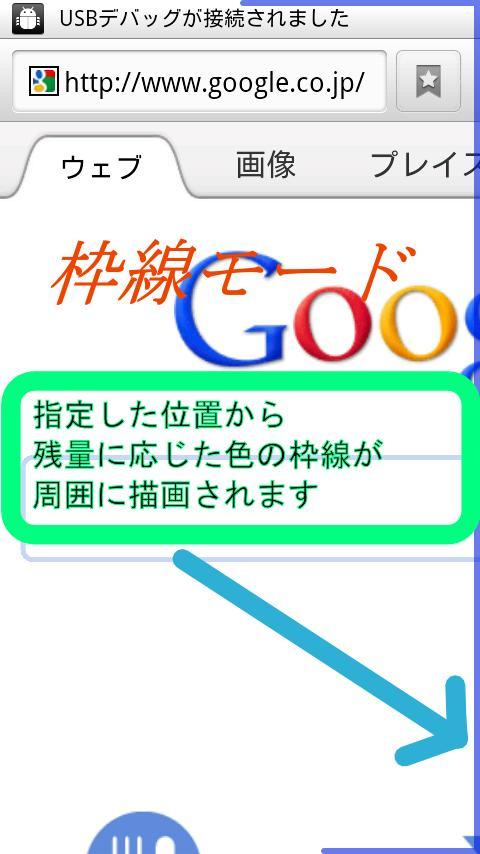
In Frame mode, Frame according to battery residual quantity is drawn by the circumference of a screen.
In Arc mode, Arc according to battery residual quantity is drawn at corner of a screen.
In Image mode, Images which you make is drawn according to battery residual quantity.
[Number mode]
When start application, please slide a screen top and adjust the position of a battery display.
A position can also be numerically specified by "Input position" of Menu.
Size can be specified in "Input size" of Menu.
Numerical color changes according to battery residual quantity as "maximum color"-> "middle color" -> "minimum color".
Image is used to the background by "Select image" of Menu.
When Image cannot be read or is not specified, the background color of Preference is used.
When horizontal length changes that a screen is longwise, it is displayed on the relative position from a reference position.
For example, it is fixable to the upper right side by setting to a "Right" and an "Top".
[Frame mode]
From 'Minimum position' to 'Maximum position', according to 'Rotate direction' frame of length according to battery residual quantity is drawn.
By changing positions, the use according to liking is possible even for the thing which used only one end from the thing using the whole screen.
Frame color changes according to battery residual quantity as "maximum color"-> "middle color" -> "minimum color".
[Arc mode]
Arc of angle according to battery residual quantity is drawn.
Arc color changes according to battery residual quantity as "maximum color"-> "middle color" -> "minimum color".
[Image mode]
Since images is drawn by the equal domain, we recommend you to arrange in the same size.
Please create in SD the folder "FloatBattery" and prepare images into it.
(You can change folder name in Preference.)
The picture to prepare becomes a maximum of 101 from stat_sys_battery_0.png to stat_sys_battery_100.png.
(You can change the prefix of files in Preference.)
When image corresponding to the amount of batteries does not exist, image of a near numerical value is used.
(You can change in Preference which shall be used between a small numerical value or a large numerical value.)
For example, when 'Search image ceiling' is on and only three pictures are prepared,
20.png : From 0% to 20%
50.png : From 21% to 50%
100.png : From 51% to 100%
are displayed in the range to say.
[Preference]
You can change
* Use float view
* Battery style
* Base position of horizontal and vertical
* Color of Minimum, Middle, Maximum
* Draw percent, Number base
* Margin of horizontal and vertical
* Draw direction, rotate direction
* Position of minimum and maximum
* Frame size
* Arc position
* Radius size
* Color and distance of Shadow
* Color of Background
* Folder name, File prefix and Search direction of image
* Color of Edit View
- It operates since Android1.6.
- It is a confirmed operation by N-04C,SH-12C.
Última versão
1.1.5Enviado por
Brandon Laï Elison
Requer Android
Android 1.6+
Categoria
Grátis Ferramentas APPClassificação do Conteúdo
Unrated · Warning – content has not yet been rated. Unrated apps may potentially contain content appropriate for mature audiences only.
Relatório
Marcar como inapropriadoLast updated on Aug 8, 2015
Add 'Use external font' in Preference of Number mode.
Draw number by using external font.
Arrange Preference.
Add 'Draw percent', 'Number base', 'Horizontal margin', 'Vertical margin' in Preference of Number mode.
Arrange Preference.
Add 'Image mode' in Preference.
You can express volume by images which you prepared by yourself.
Correct fault when a mean value becomes inaccurate.
Add 'Touch on off' in Preference in number mode.
(If you set this, it cannot show in lock screen.)




APKPure - Uma loja de aplicativos multiplataforma focada principalmente em Android, fornecendo extenso conteúdo relacionado a apps. Descubra o aplicativo que você deseja de forma mais fácil, rápida e segura, com downloads e instalações rápidos e eficientes.