Scan Date:Apr 14, 2026
Show More


Bluebird Driver focuses on the daily needs of professional drivers across Blue Bird Group fleets. It supports metered taxi operations by connecting with in vehicle systems so routine tasks stay organized throughout a shift. The interface groups key tasks in one place, which helps keep attention on the road and passengers. Clear information and consistent prompts guide each step from start to finish. For Android users inside the fleet, Bluebird Driver APK serves as the mandated companion app for work use.
IoT meter pairing
To set up accurate fares, Bluebird Driver pairs your phone with the fleet IoT meter for metered drivers. Trip data flows from the vehicle to the app so fares follow the meter without manual entry. This pairing keeps start, distance, and waiting time aligned with official readings.
Order bidding and acceptance
When new work arrives, you can browse available orders, place bids if required, and accept confirmed rides directly in the app. This keeps your shift active without switching between tools. It also helps match the right driver to the right job based on proximity and timing.
Real time navigation
For guidance on the road, the app provides turn by turn directions and accurate maps tailored to daily operations. You can follow routes that fit standard pickup and drop off flows. Navigation is integrated so you move from order details to directions without extra steps.
Earnings transparency
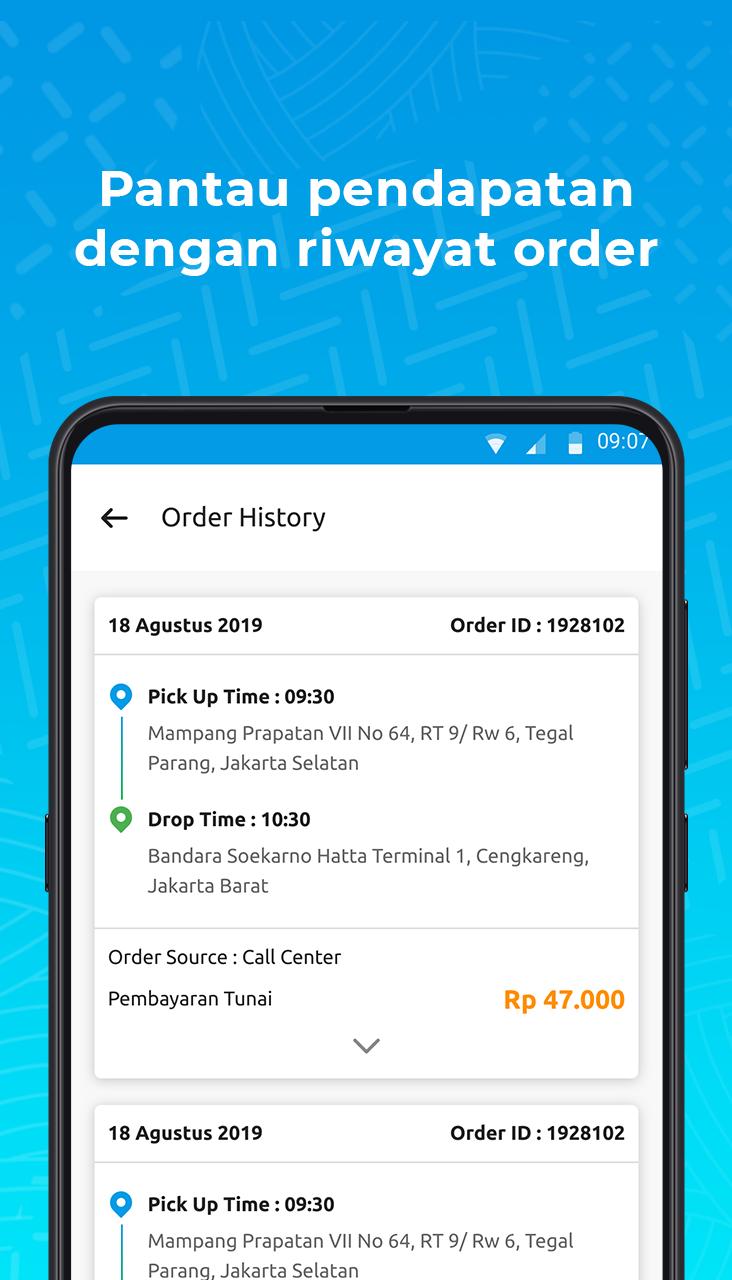
To keep earnings clear, Bluebird Driver records each completed order and summarizes daily results. You can review trip history, compare totals, and confirm payouts with the same data used during the shift. This creates a single source of truth for completed work.
In app passenger chat
When pickup details change, metered drivers can message passengers inside the app to clarify locations. Short updates often reduce missed connections and cancellations. Chat remains linked to the active order so you track all communication with the trip.
Bluebird Driver is designed for professional drivers within Blue Bird Group, including Bluebird, Silverbird, and Goldenbird fleets. It is not a passenger booking app. Riders who want to book a taxi should use the MyBluebird app provided by the company.
Some features apply only to metered drivers. Bluebird Driver IoT meter pairing and in app passenger chat require a compatible in vehicle meter connected to your fleet system. If your vehicle does not use a meter, these options may not appear in the app interface.
Blue Bird Group is a well known taxi operator in Indonesia with a long presence in professional transport services. The Bluebird Driver app aligns with company standards used across its fleets, supporting consistent service quality. This focus helps drivers follow established procedures from pickup to drop off.
The app centers common driver tasks in one place for a typical shift. To get started after installation, follow these steps to pair, take orders, and view records. If you plan to download Bluebird Driver, this outline explains the basic workflow.
Bluebird Driver connects meter data, orders, maps, chat, and trip records into a single driver app for Blue Bird Group fleets. For the Bluebird Driver latest version, install the app and follow your fleet guidelines during setup.
For official information or support, visit the developer site below.
Latest Version
2.26.0Uploaded by
RizKy
Requires Android
Android 10.0+
Category
Free Travel & Local AppContent Rating
Everyone
Security Report
Report
Flag as inappropriateLast updated on Apr 14, 2026
Minor bug fixes and improvements. Install or update to the newest version to check it out!



APKPure - A multi-platform app store primarily focused on Android, providing extensive app-related content. Discover the app you want easier, faster, and safer, with quick and efficient downloads and installations.