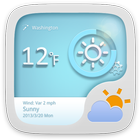
Blue Gear theme widget, supports 4*1, 4*2, 2*1 sizes. It delivers the most accurate weather information from anywhere at any time.
GO Weather EX - To Be Your Best Weather Prophet Forever!
◆How to apply the theme?
1. Make sure you have installed the latest version of GO Weather EX
2. Open the GO Weather EX->Press the themes->Click the "Installed" Tab->Click the "Widget"
3. Find the theme you have installed in "Widget" and click to apply it.
4. GO to the launcher homescreen and add the goweatherex system widget
◆How to add a System Widget?
1. Press “menu”- choose “add”-choose “Widgets”-Find GO Weather EX
2. Make sure you have enough space for placing the widgets
Latest Version
1.1Uploaded by
Isolde Gonzalez Caceres
Requires Android
Android 2.2+
Category
Free Weather AppContent Rating
Everyone
Report
Flag as inappropriateLast updated on Jul 24, 2015
Fix some bugs.




APKPure - A multi-platform app store primarily focused on Android, providing extensive app-related content. Discover the app you want easier, faster, and safer, with quick and efficient downloads and installations.













