Blicker is the result of evaluating the different classroom response solutions out there (eg. Plickers, Kahoot!, PollEverywhere, classdojo, clickers )in the market. There are many good classroom response system such as Plickers, kahoot!, clickers etc. Blicker seeks to eliminate all their disadvantages and combining all their benefits.
For example, Plickers system require students to raise up their Plickers QR code card. Kahoot! and PollEverywhere requires student to have a stable internet connection. Various Clickers solution requires internet or an actual hardware. Blicker seeks to eliminate all these additional requirements.
Blicker is the Teacher’s best tool to solicit the student’s responses.
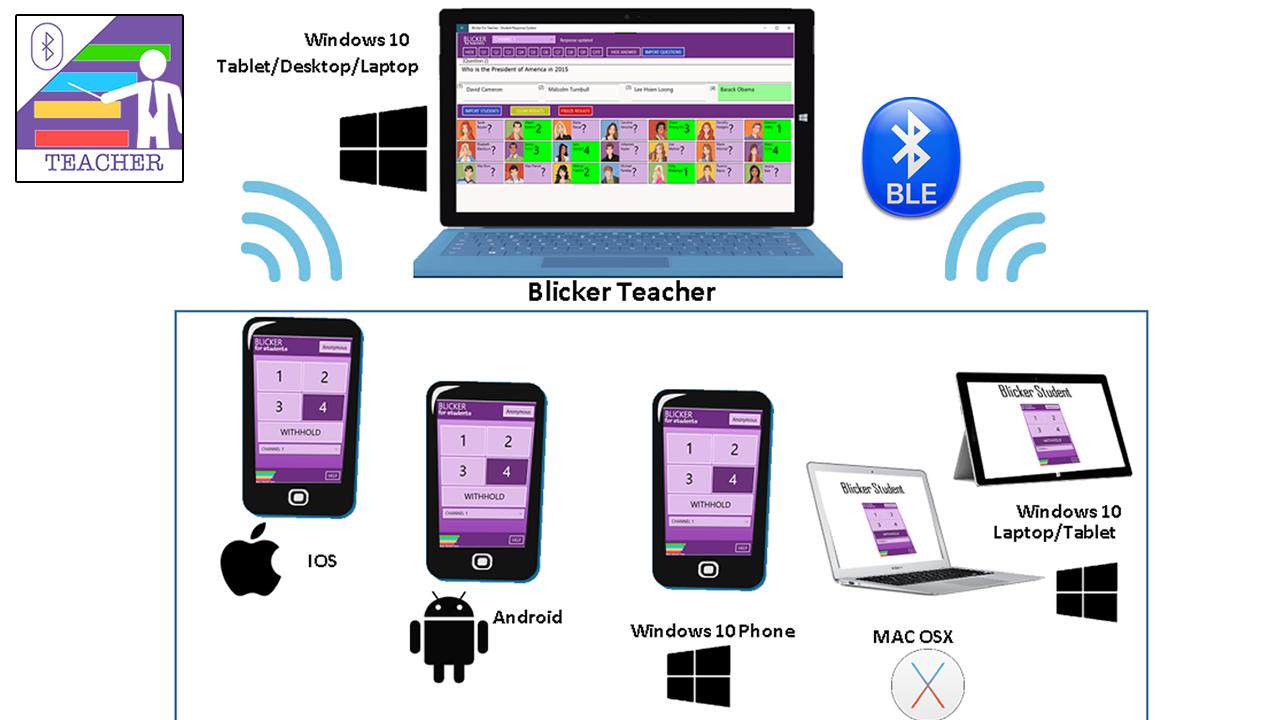
There is no set-up required, no need for additional gadget, no physical props required, no QR codes, no need for Teacher to scan QR code, and very importantly NO NEED for any internet connectivity. In fact, the only requirement that is needed is what most students would already have with them – A Smartphone – likely an Android phone or other Smartphone on other mobile platform.
All the student needed is to download the Free Blicker Student App. The app uses the new Bluetooth Low Energy Technology to transmit small data packets containing the student selected responses into the air. As there is no setup or any internet connectivity needed, all the student would need to response is to tap on their desired responses and the Blicker Teacher App will immediately show all the consolidated results in a simple bar chart.
As there is no need for any internet or sign up, the students will feel at ease to know that his responses remains anonymous.
Blicker App works in 3 different Mode. Anonymous Mode for glancing overall responses. Identity Mode for teacher to identify each student's response. Attendance Mode for teacher to automatically take each student's attendance with a timestamp.
A little bit of technicality here on the Blicker App. The Blicker Student App uses the new Bluetooth Low Energy Advertisement protocol. There is NO NEED for any cumbersome Bluetooth pairing with the Blicker Teacher App. As Bluetooth Low Energy technology is being used, this app actually consumes very low energy. Despite this, the technology allows the Blicker Student App and the Blicker Teacher App to be as far as 75 meters apart. Also, technically, the Blicker Teacher App is capable to consolidate results from hundreds of Blicker Student Apps.
This is the Blicker Student Android App. To enjoy the full suite of features, you would need to download the Blicker Teacher App
Latest Version
10.0Uploaded by
Anr Black
Requires Android
Android 6.0+
Category
Free Education AppContent Rating
Everyone
Report
Flag as inappropriateLast updated on May 11, 2019
Fixed sudden App crashes for Android version 9 PIE



APKPure - A multi-platform app store primarily focused on Android, providing extensive app-related content. Discover the app you want easier, faster, and safer, with quick and efficient downloads and installations.