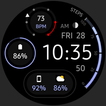
Package Name:com.watchfacestudio.awfnewdigital2
SHA-256:e7771463d9861cad97995a0d22edee69506d4fbe3d0219d969e8232cbf025baf
Show More

Only for Wear OS API 28+ devices
// Not suitable for rectangular watches
Powered by Watch Face Format
amoledwatchfaces.com
BUY ONE GET ONE OFFER!
amoledwatchfaces.com/bogo
CUSTOM COMPLICATION APPS
amoledwatchfaces.com/apps
FEATURES
• high resolution
• PNGQuant optimized layers > battery friendly
• pure black background #000000 (OLED Friendly)
• simple ambient mode - low OPR (on pixel ratio)
• many color combinations
• custom complications
• battery charging & critical indicator
• 12/24 H time
• multilanguage date
• moon phases indicator
• tap date to open calendar
• tap digital time to open alarm
• tap seconds to open custom app shortcut (complication)
USER CONFIGURATIONS
• Steps Bar (20 Gradients, Tint, White)
• Time Tint (Toggle - Only API 30+)
• AOD (Style - 2x)
• Theme (30x)
• Custom Complications
API 30+
• HR gauge can now be replaced with custom complication. If you want to use HR again, set complication to 'Empty'
Installation and troubleshooting guide
amoledwatchfaces.com/guide
Please send any issues reports or help requests to our support address
support@amoledwatchfaces.com
Join our Telegram group for live support and discussion
t.me/amoledwatchfaces
Newsletter
amoledwatchfaces.com/contact#newsletter
amoledwatchfaces™ - Awf
Latest Version
Varies with deviceUploaded by
Marco Almendras
Requires Android
Category
Lifestyle AppContent Rating
Everyone
Security Report
Check Now
Report
Flag as inappropriateLast updated on Feb 27, 2026
v1.5.5 (API 33+)
• minified watchface.xml
v1.5.0 (API 33+)
• rebuilt in Android Studio using Watch Face Format
• improved progress bar
• removed redundant resources
• code cleanup & optimizations
...
NOTE: Remove watch face from favorites and add it back to ensure watch face runs smoothly after update.



APKPure - A multi-platform app store primarily focused on Android, providing extensive app-related content. Discover the app you want easier, faster, and safer, with quick and efficient downloads and installations.