Scan Date:Jan 5, 2024
Show More

The Best And Easy To Use Apk Extractor/App Manager Is Here...
Now BackUp/Send/Restore/Delete Apps On The Go..
Features:
*Can Backup/Share/Restore/Delete Single or Multiple Apps in One Click.
*Compatible With Latest Version Of Android 5.0
*Awesome, Fast, Smooth, Clean and Convenient User Interface.
*No ROOT Access Required.
*Easily Back-Up/Extract apk of Installed Applications With Just A Simple Click.
*Easily Send Multiple Apps Via Bluetooth or Email and So On...
*Single or Multiple App Uninstall Feature.
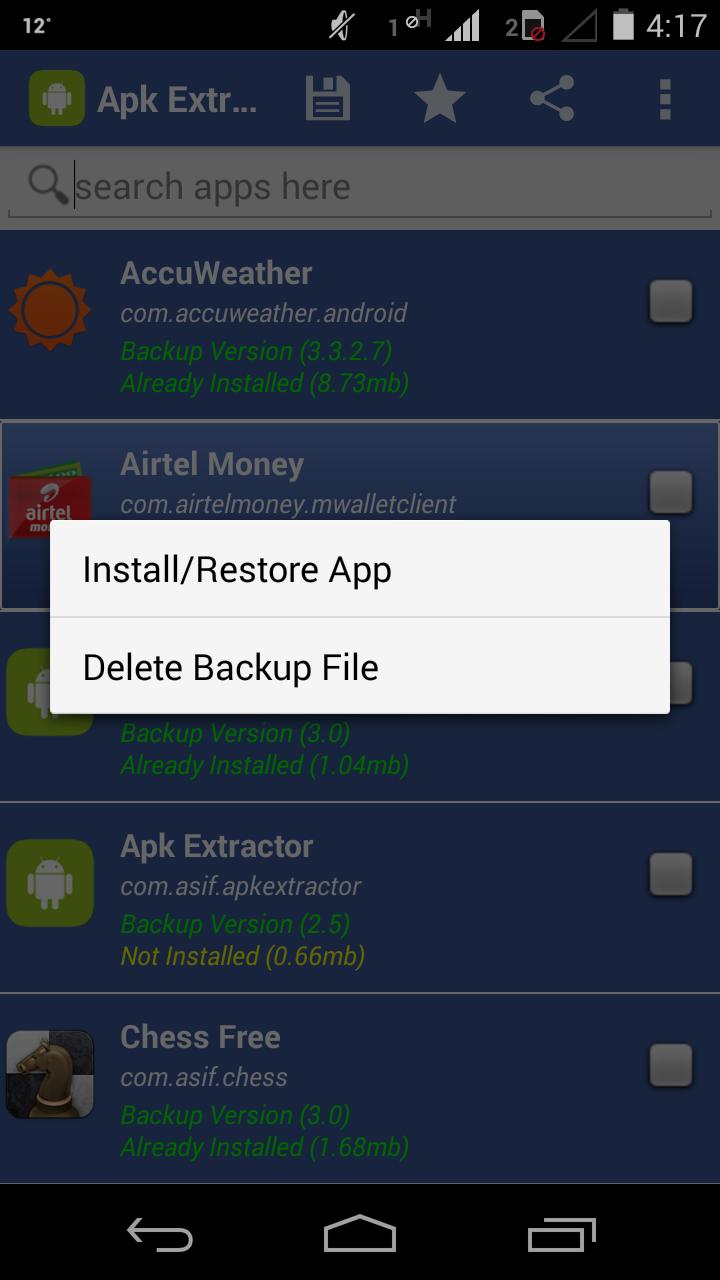
*Restore Apps Section:
-View Already Extracted Apps
-Restore single or multiple Extracted Apps in one click from within the App
-Delete single or multiple Extracted Apk's in one click from within the App
*Ability To Select Your Desired Backup Path To Anywhere In The Internal Or External Memory Easily.
*Shows Whether An App Is Already extracted or not.
*Keeps Backup of Different Versions Of Apps Separately.
*Displays User-Apps And System-Apps Separately So That You Can Find Any App Quickly.
*Sorts The List Of Apps In Alphabetical Order To Make Finding Any App More Easier.
*MultiSelect Option To Extract Many or All Apks At a Time.
*Search Option To Find Any App Easily.
*Displays ProgressBar While Extraction.
*Displays The Details Of Every Installed App:
-App Name, App Icon, Size, Version, Package Name,Install/Backup Status
*Renames The Extracted App/Apk As, "App Name(Version)(PackageName).apk",
e.g ApkExtractor(3.0)(com.asif.apkextractor).apk
NOTE: The Extracted Apk's Are Stored In "APKBACKUP" Folder.
FAQ:
Why Extraction or Backup failed??
Answer: In 99% Cases Backup/Extraction fails Because of Full Memory i.e No Memory Space left in your Selected Storage Media..
Latest Version
3.8Uploaded by
Valentin Venifleis
Requires Android
Android 2.3.2+
Category
Free Tools AppContent Rating
Everyone
Security Report
Report
Flag as inappropriateLast updated on Nov 4, 2015
Version 3.8:
*Ad Policy Fix
*Added Restore Apps Section
-View Already Extracted Apps
-Restore single or multiple Extracted Apps in one click from within the App
-Delete single or multiple Extracted Apk's in one click from within the App
*Added Single or Multiple App Uninstall Feature
*Added a Feature to Show Whether An App Is Already extracted or not
*Fixed a Bug With Android 5.0 Devices
*Fixed more 3 Bugs





APKPure - A multi-platform app store primarily focused on Android, providing extensive app-related content. Discover the app you want easier, faster, and safer, with quick and efficient downloads and installations.