
Apk Cloud addresses limited phone storage by saving application tags to the cloud, so you can free space while keeping a record of favorite or less used apps. When an app is needed again, its tag helps you find and reinstall it quickly. The approach is simple and does not move the app itself, which keeps your device clean. Apk Cloud APK suits users who manage many apps and want an easy way to track what to bring back later.
Cloud app labels
Apk Cloud saves labels for selected apps to a cloud service. This reduces local clutter and keeps a lightweight reference to each app. After you download Apk Cloud, you can start by letting the app scan installed apps. Labels act as bookmarks rather than full app backups.
Backup from Installed Apps
In the Installed Apps tab, choose apps to add to the favorites list. Apk Cloud records their labels and stores them online. This helps manage space without removing your records. Favorites make it easy to track apps for later use.
Recover from Favorites
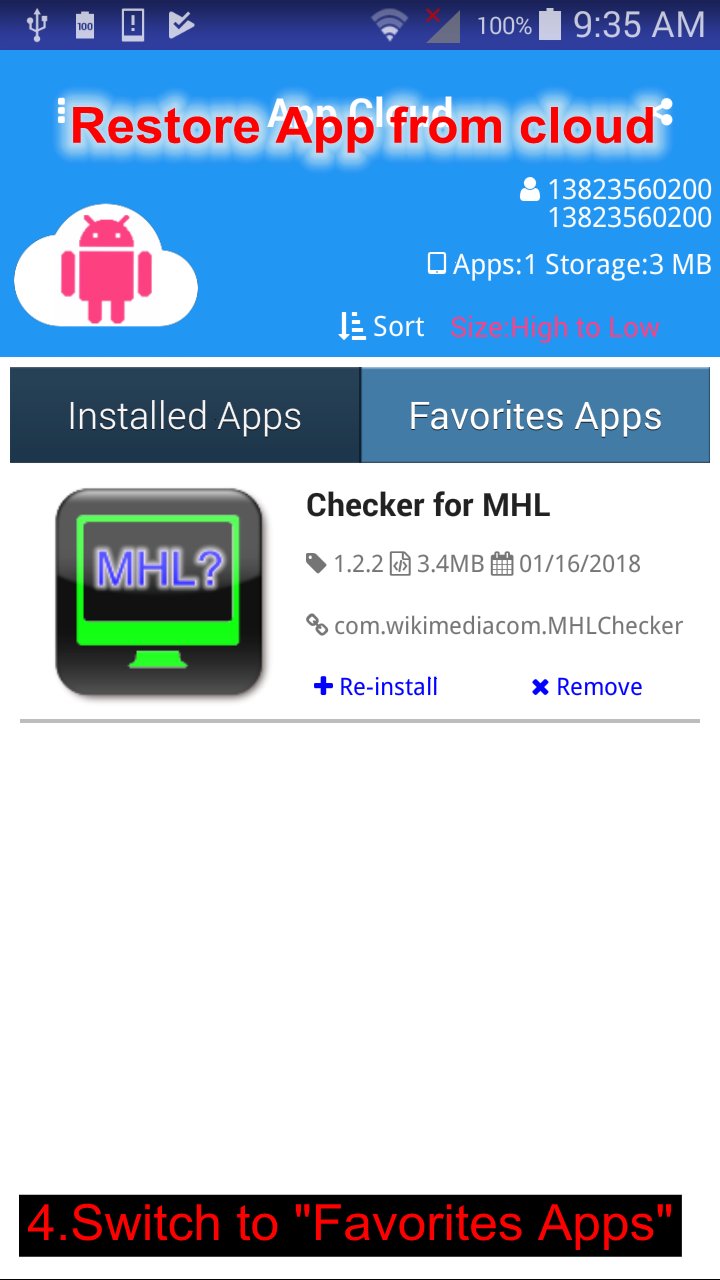
Go to the Favorites Apps tab when you need an app again. Select its tag to start reinstall on your device. Reinstallation begins from there. This keeps your list intact even when an app is removed.
Account sign in
Sign in with your account to keep label records tied to you. Apk Cloud stores labels under your login, so your list stays available after sign in. Your favorites remain linked to your account after each session.
Apk Cloud focuses on cloud labels with straightforward backup and recovery. Before installing, check for Apk Cloud latest version and review the app details. Users who manage many apps can keep space under control while maintaining a clear list to reinstall later.
Latest Version
1.0.6Uploaded by
Ikaro Nascimento
Requires Android
Android 2.3.2+
Category
Free Tools AppContent Rating
Everyone
Report
Flag as inappropriateLast updated on Sep 28, 2018
1.0.2 First release
1.0.3 Fix font issue
1.0.5 Fix ui issue
1.0.6 Support Oreo




APKPure - A multi-platform app store primarily focused on Android, providing extensive app-related content. Discover the app you want easier, faster, and safer, with quick and efficient downloads and installations.