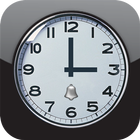
Alarm Clock with a new style of simple, chic design fits on all Android devices from Phone to Tablet.
Some basic features of the software include:
- Create multiple alarms simultaneously.
- Allow setting off the alarm by doing math.
- Allow setting off the alarm by entering the image CAPCHA.
- Allow setting the alarm off by default.
- Allows volume settings, sound, vibrate mode, repeat, snooze for alarm.
To create an alarm is very simple, you just need to click "Create Alarm".
On the screen to create a new alarm allows you to set the necessary parameters.
The most basic setup is arranged to include the following: On / Off alarm, time selection, Choose day repeat, press Select again to allow you to quickly generate an alarm to the minimum setting.
The audio settings are placed next: Vibration, Alarm, allowing you to set music.
Set the alarm off method: Select the action to off, do the math, image CAPCHA choose to turn off the alarm.
Latest Version
1.2Uploaded by
Kirisaki Light
Requires Android
Android 2.3.2+
Category
Free Tools AppContent Rating
Unrated · Warning – content has not yet been rated. Unrated apps may potentially contain content appropriate for mature audiences only.
Report
Flag as inappropriateLast updated on Oct 23, 2015
This release includes minor bug fixes and general improvements. Update to the latest version for the best experience.



APKPure - A multi-platform app store primarily focused on Android, providing extensive app-related content. Discover the app you want easier, faster, and safer, with quick and efficient downloads and installations.